Release Notes Archive - 2023
2023-12-11
A major update regarding report layouts have been implemented. We now have an architecture that allows customer specific report layouts. This will be released over time, starting with the purchase report. Over time this will be supported for the vast majority of reports.
A major update regarding how to use work object in the product header has been implemented:
When you specify a work object of type: Printing machine, Die-cutting machine, Figure processing machine or Laminating machine we are now creating a corresponding operation in the machine routing.
The specified material on the product is added as an article need as previously but it is now connected to the added operation. This represent the scenario that the material is taken from stock from that operation.
If the article need is manually reconnected to another operation it will remain like that.
The amount of material included in the article need is calculated from the need of all operations.
In the product summary on quotations, order and invoices we have added information about the quantity of child products.
When migrating a calculation from Omikai 1 to Omikai 2 we are now also migrating margins in the imposition.
A problem with adding purchase rows of certain article types in a manually created purchase has been fixed.
Information about related files to products and orders are now included in the GetOrder endpoint.
A problem where the format definition of box products was not displayed correctly when grouping products on a quotation or order has been fixed.
A problem where the calculation was not triggered when reordering operations in the machine routing has been fixed.
A problem with reordering of products has been fixed.
Plus additional minor adjustments and fixes.
2023-11-26
A problem with changing the work object when reporting back a planning card has been fixed.
The calculation of intake time on an operation has been updated and is more accurate.
The definition of a color in the color list has been enhanced with the number of included colors. A color specified as CMYK can not be defined to represent 4 colors. This makes is possible to have a more correct cost calculation on colors without having to specify each color separately.
A new parameter for other cost has been added to the operation detail. This cost will also be included in the total cost and can be used for any additional cost that is not defined in the basic parameters.
Tab between cells in the product, article need and operations tab has been improved and are now also taking hidden columns in consideration.
The support for cost centers has been added to the system. By selecting a cost center on a product this categorization will be inherited into the invoice. This can be used for analysis of the production based on financial categorizations.
The supplier fields on a purchase are now filtered to show suppliers to chose from.
The ability to group by column has been removed from all columns with multiple selections such as tags and company types.
A problem to filter on columns with true/false values has been fixed.
Plus additional minor adjustments and fixes.
2023-11-12
The functionality to renew your password if you have forgotten it has been finalized. In the login screen it is now possible to restore your password.
It is now possible to convert a quotation or order even though it is locked.
The issue with auto scroll in lists when setting filters or sorting on columns has been fixed.
Receiving company is now included in the invoice row when an order with transports is converted to an invoice.
The API has been enhanced with new fields in the endpoint for Create Order. The new parameters are:
Machine Cost
Material Cost
Labor Cost
A problem with article needs where they were not created if one product had material but no imposition has been fixed.
An problem with the color selector in the product tab has been fixed so it is working better.
An problem with discount on the printed invoice has been fixed.
Plus additional minor adjustments and fixes.
2023-11-05
The article card has been updated:
A new field Incoming quantity shows the quantity of the article included in a purchase that has been ordered but not delivered into stock.
The logic when creating purchases from article need has been updated and improved.
The logic behind a manual inventory of an article has been updated and improved.
Start cost has been added as new field on article needs. By adding a start cost on an articles prices a start cost will be added to the cost calculation of that article in a calculation.
The logic when editing a product or article need row in a quotation or order has been updated and improved to handle patching of changes in cells better using enter, tab och mouse click.
The date picker has been updated to support regional settings for additional languages. We now support Swedish, Polish, Finnish, Dutch, Norwegian, German and Estonian regional settings.
New statuses has been added on product. The new statuses are: Ready for production and ready for delivery.
The time report list has been updated and is accessible from the main menu under production.
Support for help instructions has been added on operation attributes. Help instructions will be added gradually.
A pallet label report has been added on transports.
A problem handling files with special characters has been fixed.
Customers order number has been added on quotation and order report.
Additional adjustments has been added on stock management with focus on translations and units.
Plus additional minor adjustments and fixes.
2023-10-29
The article card has been updated:
A new field Reserved quantity shows the quantity of the article included in active orders that has not been consumed in production.
A new field Available quantity shows the available quantity from the stock level when all the reserved quantity have been deducted.
A new tab Article need shows all caclulated article needs of this article.
A new tab Purchase shows all purchases of this article.
A new field Stock value shows the value of the stock in stock units.
A new field Weighted average value show the average value of the stock per stock unit.
It is not possible to create purchases of an article in the article card. It was an previous faulty option for this before.
Searching in lists have been improved and are now faster and more responsive.
A problem has been fixed so it is now possible to search in a list and then delete one or more items and still keep the search filter active.
A problem with collapsing and expanding grouping in lists has been fixed.
An action to create purchase from article needs directly in the article need tab in orders has been added. If you want to create a purchase directly for a article need without aggregating several article needs there is now no need to go to the menu article needs.
A problem has been fixed to translate the complete product definition in a quotation, order or invoice correctly for all languages.
Plus additional minor adjustments and fixes.
2023-10-22
When you send a report though email the attached report is now named as ReportName + Number.
I.e. Quotation - 242
I.e. Quotation - 242
Price list is now inherited correctly. You can set price list on account, customer card and product template.
This means that if you set the desired pricelist on the account it will always be used unless you set a specific pricelist on a customer card or a product template.
When a product is added on a quotation or order the prislist is set according to the following priority:
This means that if you set the desired pricelist on the account it will always be used unless you set a specific pricelist on a customer card or a product template.
When a product is added on a quotation or order the prislist is set according to the following priority:
Pricelist from the customer card
Pricelist from the product template
Pricelist from the account
Production place has been added as a new column on the product list.
A fallback has been added on dates for planning in the planning engine. If you plan an order and you set a date for production start it will be used for all production related operations but if the date is empty it will use the previous date in this case proofing done. This is handled for all types of operations and for all typed of dates for planning.
When you are composing an email and add receivers your chose a contact person from the list or write a unique email. If you start to write a unique email and change your mind and leave the cell the text you have written is removed.
Updates have been made in the lists to fix problems with combinations of filters and sorting.
A problem has been fixed so it is now possible to choose global tags in all registers.
A problem has been fixed so there is now wrong error messages when creating a new purchase.
Updates has been made on summary on products and order level so cost and system price is calculated correct for products including child products like set, block, booklet etc.
A problem displaying packaging labels in the transport list has been fixed.
Plus additional minor adjustments and fixes.
2023-10-13
Product format and number of pages are shown on all types of planning cards and are handled as references. This means that if you change product format or number of pages on a product after planning it will show the new updated values on the planning cards.
Manual inventory, inbound delivery or withdrawal can now be used with decimal numbers on both amount and cost. I.e. it is possible to do a manual inbound delivery of 13,3 m2 for 12,5 Euro.
The order in which invoice rows are created when converting orders to invoice has been updated.
Invoice rows are created in the following order:
Invoice rows are created in the following order:
Products with production
Products without production
Optional or addition operations
Transports
When creating a direct invoice fields are updated according to the selected customer.
It is now possible to add, edit and remove profiles.
The menu UI has been updated so that expanded menu items are flowing corrrectly when scrolling.
A source is generated on an invoice when a credit is made from an invoice.
The tab purchase on an article card is displaying associated purchases for that specific article.
The column article type on article price list has been adjusted to show selected data correctly.
Achieved contribution has been added as a new key figure on the order and product summary to show how much the contribution based on the net price is compared with the contribution based on the system price. For an existing order this will not be calculated unless the order is recalculated.
System price has been added as a new key figure on the order and product summary to show the sum of all net prices for articles, operations and external work. For an existing order this will not be calculated unless the order is recalculated.
Plus additional minor adjustments and fixes.
2023-10-08
Omikai 2 offers two options for sending email directly from the system.
SMTP - You can configurate it by setting up the SMTP-connection on the account or profile and the individual authentication on each user.
When it has been properly setup all outgoing emails will be sent through your companies outgoing mail-server and all replies will be sent directly to your personal email inbox.
When it has been properly setup all outgoing emails will be sent through your companies outgoing mail-server and all replies will be sent directly to your personal email inbox.
No-reply - You activate no-reply by the switch on the account settings.
When it has been properly setup all outgoing emails will be sent through Omikai's email-server using
no-reply@omikai.com as sender and there is no possibility to respond directly to that email.
To inform the receiver of this it is custom to add a disclaimer in the footer of your email body informing about this and also supply information about what email to reply to. You can change the template of your email body for each type of message on your user settings in the templates section.
When it has been properly setup all outgoing emails will be sent through Omikai's email-server using
no-reply@omikai.com as sender and there is no possibility to respond directly to that email.
To inform the receiver of this it is custom to add a disclaimer in the footer of your email body informing about this and also supply information about what email to reply to. You can change the template of your email body for each type of message on your user settings in the templates section.
The accounts receivable report have been updated to fix a problem with currency conversion.
When marking an invoice as paid and automatically creating payment rows a currency conversion problem has been fixed to handle invoices with multiple decimals.
When an invoice is approved it is now possible to change payment terms, invoice method, cost center, name and comments. This is to handle situations where an invoice has do be synchronized with an external financial system. If the synchronization fails it is now possible to change relevant fields and synchronize again.
It is now possible to change product status in the product tab in an order just as you can do it in the product card. This makes is quicker an easier to change individual statuses without being forced to open each product one by one.
New statuses has been added for a product. The new statuses are "New", "Paused", "Production in progress" "Production done" and "Delivered".
A rework has been done on the cache management to better handle when changing columns in a register
New customer fields have been added to a quotation and order confirmation report. The new fields are:
Customer purchase number
Customer department
Customer marking
Customer cost center
Additional material from a finishing operation or manually added are now displayed on the work order in a new section called "Article need". The old section "Material" still holds main materials selected on the product.
This is not shown automatically so you have to update your report settings to show that section.
This is not shown automatically so you have to update your report settings to show that section.
A new column for "Planned ready for delivery" as been added on the planning card register.
A new tab for reference numbers has been added on the customer card. This can be used for multiple purposed. I.e to collect all customer numbers on a transporter. These number can later be used as transport numbers on a transport.
When articles are added manually and there is no need for a consumption for intake the total consumption is now calculated correctly whether or not the intake consumption is defined as 0 or nothing.
When calculating on-printing the specified colors used for pricing and performance calculation are now taken from the operation and not the product.
Plus additional minor adjustments and fixes.
2023-09-26
Expire date is now automatically calculated for each invoice when it is approved.
Production start and finishing start has been reintroduced in the date settings for order planning.
Dates are divided into two blocks: Dates are general dates to be displayed and Dates for planning are dates that effect the planning.
Proofing done, production start and finishing start are working in combination with the production order of the operations so if the order makes an operation starting at 09:00 but it is a finishing operation and finishing start is set to 11:00 the start time of the operation will be 11:00.
If the finishing start is not set, the starting time will be 09:00 according to the operation order.
All manual added operations are now getting pricing according to the selected pricelist.
Multi select and drop down components are not automatically opened when navigated to, only selected. This is to avoid unnecessary flickering when tabbing through the fields in a form and it is also more according to UI-practice.
If a system product template is copied it is now considered to be a standard product template and can be edited or deleted like any other template.
Rework of report settings to better handle fallbacks, inheritence and settings.
If a quotation has a report setting it will be used in the report, if the quation does not have a report setting the report setting will be taken from the customer and otherwise from the account.
When a quotation is created the report setting is inherited from the customer card.
This behavior is the same for all types of report settings.
A problem with price calculation of laminering has been fixed.
A problem where a manually adjusted production time has been set on an operation didn't effect the duration of a planning card when planning has been fixed.
Price/h has been added as an outcome to the price list for all types of operations.
Invoice status is now also shown on invoice rows.
Custom sheet format is now also calculated depending on selected the orientation of a product in the imposition.
A new outcome for price/circumference has been added to the price list for CAD-cutting operation.
The quantity on optional operations in reports are now showing the quantity from the operation and not from the product.
The currency conversion has been adjusted in Omikai 1 so when setting an invoice to paid and automatically create payment rows.
A problem with calculating following price for some finishing operations when calculating with a speed type of pieces/h has been fixed.
Following price on products are now also effected by the product discount.
Plus additional minor adjustments and fixes.
2023-09-17
Following price is added on external work, article need and product. This can also be overridden by a custom value.
The operations are added according to the initial prioritisation of operations and then in the order they have been added. Initial prioritisation can be setup different for each account
If the account has been setup with prepress as prio 1 and print prio 2 then the scenario will be as follows:
You add a prepress operation. The prepress operation is placed first.
You add a print operation. The print operation is placed second.
You add another prepress operation. The prepress operation is placed second and the print operation is moved to third.
You add another print operation. The print operation is placed fourth.
If the account has been setup with prepress as prio 1 and print as prio 1 then the scenario will that everytime an operation is added it will be placed last and this is as follows:
You add a prepress operation. The prepress operation is placed first.
You add a print operation. The print operation is placed second.
You add another prepress operation. The prepress operation is placed third.
You add another print operation. The print operation is placed fourth.
New parameters has been added to operation in the Create Order-endpoint:
Speed to set the custom speed of the operation.
AmountGross to set the gross price of the operation
AmountNetFollowing to set the following net price of the operation
All lists in a price list can now be sorted such as operation prices, article prices or product prices.
It is now possible to remove an article in the product tab of an order or in the operation details view such as laminat on a laminating operation.
The popups on transport for receiver and sender has been redesigned to work better.
Locations in the location tab of a customer card is now displaying location types.
Warnings on products has been redesigned to work better.
Plus additional minor adjustments and fixes.
2023-09-10
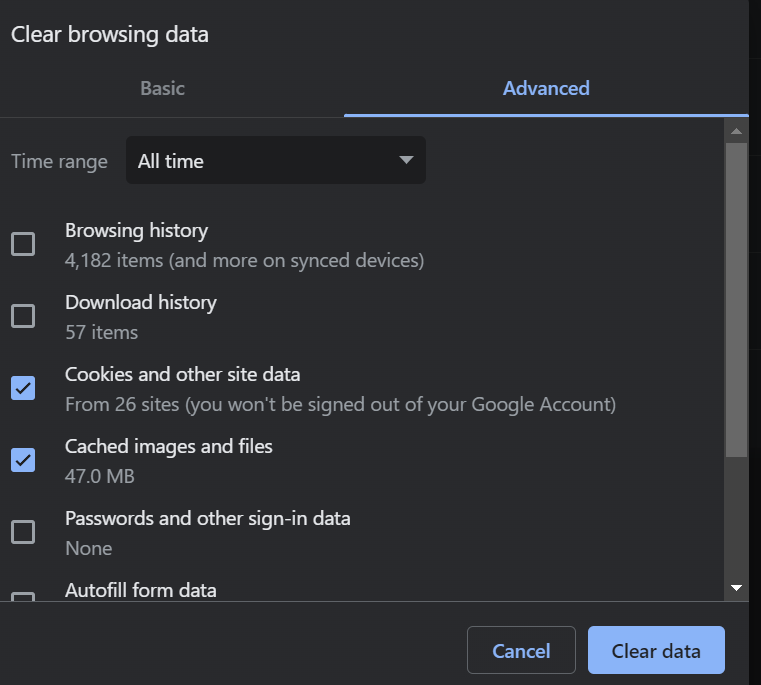
This is a big release and a lot of pages have been updated and/or adjusted. The new versions of the pages are always automatically loaded but for some restrictions in certain browser settings this could sometimes fail. If this happen and you don't get the expected behaviour one solution can be to manually delete the cache of the application. You do this by pressing Ctrl+Shift+Delete on Chrome and Edge and Cmd+Alt+E on Safari. There you can chose to delete cookies and other site data together with cached images and files. This will force the browser to update the pages in the application.
All webhook subscriptions can be configured by the customer. You can add, edit and remove your own subscriptions.
All executions of the webhooks can also be monitored by expanding the webhook to see all transactions made. This means that the synchronization result on a invoice card has been removed and you can see the results on the webhook page instead.
The product type "Article" has been removed. It is a legacy from Omikai 1 and the best practice to add articles to a product is to add it in the article tab.
The article selector in operation and product has been adjusted to handle selection of articles better
Markup on articles, external work or sales margins can now be set to more then 100%
The UI has been updated with new frameworks and components mostly focused on menu, table and cards.
When reporting an inbound delivery on a purchase order you are now prompted with the purchased quantity as the suggested quantity instead of the need.
The planning calendar now have the same functionality as the planning card list such as start, stop and open planning cards. Click on the card to open the context menu with all available actions.
A comment field has been added to transports. This comment is also displayed on delivery notes.
When reporting a planning card the dialog is initiated with time and article consumption from the calculation.
The operation parameter "Pages" are now accuratly affecting all related operations for printing and laminating. If you for example manually override the colors on a print operation from single paged to double paged the passes in the machine will typically be double.
The incvoice rows now always allow negative and positive numbers both for invoices and credit invoices.
It is now posible to override quantity on operations of type "Other".
All operations now calculate a following price. If you dont want to following price on an operation you can manually override it to 0.
Following price is now also calculated on all operations if you use a production place with speed type "Piece".
Plus additional minor adjustments and fixes.
2023-08-04
An issue where a new invoice didn't get a invoice type is now fixed.
An issue where optional and added operations wasn't showed separately on quotations and orders are now fixed
New status handling has been added in the transport register
New parameters have been added on the API for GetAccount, GetCompanies and CreateOrder making it possible to handle more company specific data such as profile, invoice method, payment term, delivery term etc.
It is now possible to change a gross price to 0.
It is now possible to register an inbound delivery with 0 cost.
Fields and sections on the account card have been adjusted and corrected.
An issue when updating addresses with the wrong result have been fixed.
Tags on addresses are now aligned in all places where it is handled.
Planning dates have been adjusted and mapping been corrected and improved in the API and CreateOrder.
An issue where the product hierarchy sometimes wasn't correct in the API and GetOrder is now fixed.
An issue with colors being registered wrong in the API and CreateOrder is now fixed.
An issue with quantity on operation templates in the API and CreateOrder is now fixed.
An issue where the planning was done wrong due to errors in the schema settings is now fixed.
21% VAT has been added to applicable geographical markets.
GetProductTemplate and CreateOrder in the API now don't accept the use of deleted product templates.
An error in the VAT-calculation when using separate account plans on individual operations are now fixed.
Favourites in the article selection dialog and the article register are now aligned and share the same favourites.
A comment field has been added in the inventory dialog on articles making it possible to add a custom note to why the stock level was updated.
New web hooks have been added in the API for orders making it possible to trigger external workflows when initiating or finalising an order.
Plus additional minor adjustments and fixes.
2023-06-29
Transports are now included when you convert order to invoice.
Transports are now included in the total order value.
The dialog for sending emails have been enhanced so it is now possible to add multiple receivers and also enter email addresses manually.
Product groups have been enhanced to handle included operations
A new quantity type called "Quantity per unit" has been added where you can specify the quantity in relation to its parent. E.g. the parent product has a quantity of 1000 and the child product has a quantity of 2 "Quantity per unit" will result in the child having a calculated quantity of 1000*2=2000.
This is useful every time you want the child products quantity to be dependent on the parent and want this to be dynamic and affected by you only changing the quantity on the parent.
This is useful every time you want the child products quantity to be dependent on the parent and want this to be dynamic and affected by you only changing the quantity on the parent.
New columns have been added in the transport register: "Ready for delivery" and "Actual delivery"
New columns have been added in the order register: "Customer" and "Ready for delivery"
Statuses on quotation, order, product, and planning card have a new color palette.
An issue with unit price on products when converting order to invoice has been fixed
Plus additional minor adjustments and fixes.
2023-06-16
When an quotation or order is converted into a new quotation or order the statuses are reset
An invoice is set to sent when an invoice is sent to the customer
An order is set to sent when an order confirmation is sent to the customer
The sequence of status is handled on planning cards, products and orders. When a planning card is started the status on the product and the order is changed to production in progress, when all planning cards are done the product is done and when all products are done the order is done. This way you will have a very good overview of the entire working process and in what phase each order is currently
When an order is planned the planning cards name is now based on the custom name for an operation and a fallback on the type of operation
Several different types of thickness on articles have been merged into one for all article types. Thickness is displayed in um
New conditions and outcomes are added to finishing operations in the price list to better correspond with the settings in Omikai 1
The login process has been adjusted to better display proper information when you enter the wrong password or use to many attempts to login
The sequence of colors and number of pages to process has been adjusted so that if you override the colors on the printing operation it will affect the calculation properly
The colors on statuses for planning cards have been adjusted
When you add or update a transport the list of companies to chose from are now limited to only transporters
The calculation of color cost is fixed to that it is taking the settings from the operations correct production place instead of the products production place
The purchase tab in the article card is now only displaying related purchases instead of all purchases
Cache handling has been improved to fix the issue that you sometimes could loose information in the registers such as displayed columns
Transports in an order is now also created as invoice row when invoicing an order
Transports are now shown on quotations and order confirmations
Customer and ready for delivery has been added as new columns in the transport register
Ready for delivery and actual delivery has been added as new columns in the order register
Status has been added on an articles stock log to give better information about what type of transaction has been made
A start page has been added to the system with a welcome information and this fill in the future also include customer specific widgets with additional data
An issue when product format in combination with flat format wouldn't produce a correct imposition has been fixed
Sorting of operations can now only be done on a products top level. This is to avoid incompatibility of the sort order between the children and the parent product
Other company has been added when choosing an adress in a transport or a purchase. This is also displayed on the printed reports. This is for situations where you are supposed to send a transport or a purchase to an address for a company that is not in your CRM
Sender and receiver can now be updated on a transport at any time
A problem where additional article needs where created on every recalculation of a product with no operations is fixed
A problem with sorting of operations is fixed so that the sort order is now always correct after each resorting
A problem that made is impossible to calculate a product that is longer or wider then the width of a roll is now fixed
Custom format is now recalculated every time you update a products format or the format of the material used
A problem with converting a quotation or order to a new quotation or order is fixed so that related data such as a customers reference number, order number, purchase number, department and cost center is now fixed
Adjustments on the invoice report have been made to include a customers reference number, order number, purchase number, department, cost center and order number
Plus additional minor adjustments and fixes.
2023-05-31
Changes have been done in the imposition engine to better handle various orientations when imposing on rolls to reduce material waste and increase paper utilization
The login page has been adjusted to better support various password handlers
Purchase and order number has been added to the stock log to improve the possibility to track where changes in the log derives from
Support for importing Kepa-files has been added
Changes has been done on handling reservations for products including only finishing. When no time and material reporting has been done by an operator the assumed consumption is deducted from stock when finalizing an order in production.
Plus additional minor adjustments and fixes.
2023-05-15
The purchase order report has been updated with more content
New user roles with updated permissions has been added. The affected user roles are:
(System Administrator, Sales Manager, Project Manager, Finance, Operator, Planing Manager and Purchase Manager)
(System Administrator, Sales Manager, Project Manager, Finance, Operator, Planing Manager and Purchase Manager)
New cut down formats has been added to the imposition configuration
There is now a possibility to configure click cost on a printing press based on running meter
Cache support has been added to registers making it possible to chose a favorite view and do other filtering that will remain active until you chose another favorite view
It is now not possible to add an previously deleted operation template through the API
How currencies are displayed in products and operations has been improved to better match the account settings
It is now possible to create your own bookkeeping accounts
The search field in registers has been adjusted to handle jumping between multiple search criteria's better
The functionality to calculate number of sheets and number of pages for blocks and sets has been improved and adjusted to match the product settings better
The functionality to add new rows in an inline editing registers has been improved
Imposition default margins has been removed and will be handled through settings in a product template or system default settings
Markup in the article pricelist has been fixed
More data is automatically updated when changing a product specification and forcing a recalculation
Plus additional minor adjustments and fixes
2023-05-01
Favorite views and custom filters are now working in combination.
Parameter for Gross Price has been added to the Create Order endpoint. It is now possible to override the pricing on a product with an external custom price.
It is now accepted to specify number of pages on a product to 1. This is handled the same way as if you would specify 2 number of pages.
Article needs created via the Create Order endpoint are now being calculated as any created article need.
Discount for a product can now allow 0% discount.
Parameters for Description and Order number has been added for the Get Planning Card endpoint.
Parameter for CreatedFrom has been added on order level in the Create Order endpoint. This can be used to pass information from where the order was created so you can differentiate that per order in the order register.
Parameter for tags has been added on operation and product level in the Create Order endpoint.
Parameters for color coverage, front colors, back colors has been added on operation level in the Create Order endpoint.
2023-04-16
Status handling on purchases has been added.
A report setting for simple or complete reports has been added on all reports making it possible to chose if you want to have detailed meta data for each row or not.
The dialog for inbound delivery has been expanded so you can specify the quantity of each received article.
Units has been added on article and purchase data.
Auto generated purchase number has been added to purchase.
2023-03-30
The possibility to login using Azure AD (Active Directory) has been added in the login screen. To setup this please contact Omikai support for guidance
Following quantity has been added as a new field on product level on the CreateOrder endpoint
The possibility to add credit invoices has been added in the invoice module
Tags has been added as a field on all Create endpoints
Query parameters has been added on GetPlanningCard. It is now also possible to filter on dates for Planned Start From, Planned Start To, Planned End From and Planned End To.
Query parameters has been added on GetCompany. It is now also possible to filter on email, name and company number.
Inbound deliveries has been moved from stock log to the purchase card.
Color settings on products has been changed so its possible to differentiate on 0 colors and no colors. If you dont specify any colors nothing will be displayed.
Status handling has been added on invoices
2023-03-19
Column width can now be saved in favorite filters for related tabs
A stock log has been added to the article card. In the stock log you can see all inbound deliveries, withdrawals and inventories on that article.
New roles are added in the system for operator, sales manager, project manager, finance, planner, purchase manager and system administrator.
New fields has been added for department, cost center and reference number on contact level. These fields are also transfered to order, product and invoice. Purchase number and order number has also been added to order and product to differentiate these.
The integration with Pagero for eInvoicing has been migrated to Omikai 2
New parameters on machines has been added for intake. It is now possible to specify separate intake times on first, following per color, per intake and per plate.
2023-03-05
An End-Point has been added in the API to convert orders to invoices.
An End-Point has been added in the API to update a planning cards status.
An End-Point has been added in the API to update an orders status.
Customers article number has been added in the company section on work orders.
Integration with Fortnox is migrated from Omikai 1 and is now operational in Omikai 2.
It is now possible to pass tags as parameters when using CREATE-End Points.
Tags are also included in all GET-End-Points.
The End-Point for GET ProductTemplate has been extended to include all included products.
The End-Point for GET Order has been extended to include a ProductTemplateNumber on all included products.
The gross price field has been extended on products so it is now possible to specify a price per unit or a total price for each product. If you specify a price per unit the price to pay will be changed accordingly when changing the quantity on a product.
2023-02-19
In the product tab in a quotation or order there is now a link to the product template used for the product. If you click it you will navigate directly to the template.
The migration from Omikai 1 to Omikai 2 is extended to now also include production articles and additional articles to production.
The period of validity is now set automatically when creating a quote. You can change your default period of validity on the account settings.
We have added additional key-figures to the product and order summary to get a better overview of the profitability and scope of the production
We have added the possibility to add information about articles for a product through the API. This could be used for example for die-cut forms, frames and other types of additional articles that you need for the production.
When creating favorites in register column width and column order is now also included.
2023-01-30
All documents now handle date, time and number formats according to the customers specified country code
All orders created through the API now includes additional data in the response for pricing on product and order level
It is now possible to add individual material formats for finishing operations to support partial finishing
It is now possible to limit a product template to only be used for a certain company if you have specific scenario for one customer
Now all default product templates are visible making it possible to define the default configuration of each standard product and not only customer generated product templates
Now it is possible to add an individual delay for each operation in the planning engine. This means that if you want to reserve time for some activities between operations to make a more accurate time plan for production you can now take that in consideration
Now it is possible to display flute direction in the imposition editor when calculating on corrugating or converting production
Now it is possible to include production information when creating an order through the API
Now it is possible to include products with multiple levels of children when using the API
Now it is possible to override cost calculation method in all operations in a calculation
We have added a more extensive support for pre-defined e-mail templates for all customer documents making it possible to specify a default text, signature etc.
We have added a support widget in the UI making it possible to search our knowledge-base directly from within the system
We have added support for pagination of freight documents to specify the range of a delivered batch of products
We have added support for projects in the planning module so it is possible to get a better overview and control of individual projects when working with production planning
We have added support for setting up individual SMTP settings for each user
2023-01-20
It is now possible to change the order of products in an order. This is also shown on customer and internal documents such as quotation, order confirmation and work order
Is is now possible to handle invoices in batches when approving, viewing or sending invoices to customer
More columns are included in the global register search such as tags, dates etc.
Now it is possible to export data in registers to Excel or PDF
The color calculation is enhanced. This means that each user can define their own set of colors including behavior and cost
The control of logotypes on freight documents is enhanced. It is now possible to setup individual behaviors of if a document should show your logotype, the customers logotype or no logotype.
The status handling on orders have been enhanced to support individual production, logistics and invoicing status
We added a link to the customer from the order card making it easy to navigate for further information
We added support for the possibility to change column order in the registers
We have added support for Dutch language in the user interface
We have added the support for getting account information in the API
We have added the support to add multiple printing operations with individual cost calculation methods and color specification to the same product
We have redefined the handling of finished goods making it possible in an easier way to automatically add produced products to a stock article with individual quantities and cost for warehousing
We redefined the handling of user emails to better prevent duplicate user settings
2022-12-21
- Now we handle support for SSCC information in freight documents
- We added hyperlinks to all related fields in a card such as contact on an order or work object on a product. This is displayed as an icon next to the field
- We have increased the possibilities to handle multiple shelves in a warehouse
- We redefined the method for calculating stock value and now take in consideration when an article was received and to what cost
- We redefined the support for inbound deliveries giving more control in how deliveries are handled either in batch or individually with specific quantities or warehousing
Related Articles
Release Notes Archive - 2024
2024-12-15 We have added additional support for optimizing the calculation of the number of plates when printing multiple signatures with similar colors. When you specify the editions you can now add information about unique colors. This will be ...Release Notes Archive - 2025
New Release: 2025-12-02 This release focuses on usability improvements, purchasing and transport enhancements, extended APIs for BI and reporting, webhooks migration, and stability fixes. Usability and documents: Better handling of dates, currencies, ...Release Notes 2026
New Release Version: 2026.8 Release date: 2026-06-29 Version 2026.8 delivers new estimating and sales-pricing capabilities, CRM and purchasing enhancements, expanded API and integration support, and a broad set of fixes across estimating, finance, ...Differences between Omikai 1 and Omikai 2
Goal This article should explain what information is migrated from the old version (v1) to the new version (v2) of the system, so you can plan and verify your upgrade with confidence. The provided transcript does not include the detailed list of ...Migration process
Goal This article explains the end-to-end process to migrate from the legacy environment (version 1) to the new environment (version 2). It describes each phase, responsibilities, approvals, and what happens at go-live. Procedure Step 1: Plan the ...