Release Notes Archive - 2025
New Release: 2025-12-02
This release focuses on usability improvements, purchasing and transport enhancements, extended APIs for BI and reporting, webhooks migration, and stability fixes.
Usability and documents:
Better handling of dates, currencies, descriptions, addresses, and article prices.
Purchasing and transport:
Purchase row export and support for transport price lists.
APIs and BI:
Export/import of price lists, extended APIs, and download of reports via API.
Webhooks:
New architecture and migration of existing implementations.
Stability and fixes:
Corrections for collective invoicing, report endpoints, templates, and company updates.
New and Improved
Usability and Documents
Manual date entry:
When entering dates manually, the system now respects the configured date format on the account so the date you type is both stored and displayed in the correct date format.
Campaign and quotation addresses:
If no campaign address is set, the system falls back to the quotation address, reducing the risk of missing or incomplete addresses on documents.
Currency symbols:
The system now displays the correct currency symbol in all affected places, improving clarity in multi currency environments.
Description length on articles:
The article description field has been extended to allow longer descriptions, which is useful when more detailed product information is needed.
Address popup defaults:
The address popup now initiates with company and address by default, speeding up address entry.
Article prices and Excel import:
Manually added article prices are correctly handled when importing Excel price updates, so manual work is not overwritten unintentionally.
Locked orders and status messages:
Improved messaging so that status change warnings on locked orders better reflect what has actually happened.
Fonts in Telerik templates:
Templates containing the Tisa Sans Pro font are now rendered correctly.
Purchasing and Transport
Purchase row export:
The purchase row table on the order now has Excel and PDF export. The export uses the same columns as the table so data can be handed over to warehouse, suppliers, or internal stakeholders.
Transport price list:
Support has been added for transport price lists, enabling more structured transport pricing.
Price List management
Excel and API export/import of price list data:
Import and export of price list data via API and Excel has been introduced for easier configuration. The data supported for a price list are
Operations
ProductTemplates
Articles
Transports
API
Download reports via API:
A dedicated endpoint allows clients to download reports with selected parameters.
Report API:
An API-documentation has been added for the Report API. The URL is https://cloudreport.omikai.com/
BI API:
An API-documentation has been added for the BI API. The URL is https://bi.omikai.com
Extended APIs:
Several APIs have been enriched with additional detailed fields across quotation flows, costing, stock handling and logistics:
API.Quotation:
TotalTransportCost
– The total cost of all transports
TotalTransportPrice – The total sales price of all transports
API.Order confirmation:
TotalTransportCost
– The total cost of all transports
TotalTransportPrice – The total sales price of all transports
Report.Order confirmation:
Transport.DeliveryAddress.Company
– The company the transport is sent to
Transport.DeliveryAddress.Contact
– The contact at the company to handle the transport
Transport.DeliveryAddress.OtherContact
– Another contact, not existing in the CRM to handle the transport
Transport.DeliveryAddress.Country
– The country the transport is being sent to
PublicDescription2
– The secondary description for the order
Contact.Title
– The title of the contact person
Report.Quotation:
Transport.DeliveryAddress.Company
– The company the transport is sent to
Transport.DeliveryAddress.Contact
– The contact at the company to handle the transport
Transport.DeliveryAddress.OtherContact
– Another contact, not existing in the CRM to handle the transport
Transport.DeliveryAddress.Country
– The country the transport is being sent to
PublicDescription2
– The secondary description for the order
Contact.Title
– The title of the contact person
Report.Invoice:
OurReference
– The responsible contact person from the sender of the invoice
Company.LegalName
– The legal name of the company
Contact.Title
– The title of the contact person
Report.Delivery Note:
Company.LegalName
– The legal name of the company
Contact.Title
– The title of the contact person
Product.Format – The end product format of the product
Report.JobTicket:
Company.LegalName
– The legal name of the company
Report.Packaging Label:
Delivery.Address
– The receiving address of the transport
OrderCustomerOrderNumber
– The customer order number of the order
OrderCustomerPurchaseNumber
– The customer purchase number of the order
OrderCustomerDepartment
– The customer department of the order
OrderCustomerCostCenter
– The customer cost center of the order
OrderCustomerReference
– The customer reference of the order
ProductCustomerOrderNumber
– The customer order number of the product
ProductCustomerPurchaseNumber
– The customer purchase number of the product
ProductCustomerDepartment
– The customer department of the product
ProductCustomerCostCenter
– The customer cost center of the product
ProductCustomerReference
– The customer reference of the product
Webhooks
Core, API, Integration, callbacks and UI migration: Webhooks have been migrated in core, API, integrations and UI, paving the way for a more flexible webhook architecture. The usage of webhooks are now according to the following. Webhook callback registration has been introduced and existing implementations have been migrated to the new model.
Register a new webhook and specify
Nam
e - What name do you want to give to your webhook
URL - What URL do you want the webhook to call when the event is triggered
Activate the webhook. This will challenge the URL and only activate it if the URL gives a correct response
When the event is fired all webhooks subscribing on that even will make a call to the specified URL
You can see the result from the webhook deliveries either
On the actual detail page
Fired at
- When the call was made
Topic
- What event was fired
Name
- The name of the webhook
Delivery status
- The result from sending the call to the URL
Payload
- What was sent to the URL
Message
- What response was received from the URL
Attempt status
- What status was received from the URL
Attempt number
- What call in order was made to the URL
If the call was unsuccessful and the response status was failed you can click the arrow icon to make another attempt
On the webhook page if you expand each webhook
New webhook topics have been added for
Order.TransportSent
Order.Status.New
Invoicing and Financials
Collective invoices:
The limitation when creating collective invoices has been addressed so larger sets of invoices can be processed. We now allow up to 200 orders to be converted collectively to one single invoice.
Invoice creation from a specific order:
A bug that prevented an invoice from being created from a specific order has been fixed. This was happening when an article had a too big description.
Company and Data Integrity
Update Company:
Fixed a problem with the Update Company logic to ensure company data stays consistent. The field credit limit was not handled properly.
Known items and fixes
Plus additional minor fixes and adjustments.
New Release: 2025-11-02
This release include permissions, planning, resources, KPIs on labels, purchasing and transport, API and webhooks, integrations, and BI rollout.
Operations and Planning:
Spine support for books and booklets, show assigned user on planning card, people count in SFDC, plan proofing done in lists.
Permissions:
Action level permissions on roles for statuses, reports, and actions beyond CRUD.
Resources:
New article type Finished goods and preparation for rename from Articles to Resources. Article type visible in Article Needs for filtering.
KPIs on Labels:
Weight, volume, and CO2 is not possible to include on custom package label, pallet label, and delivery note.
Lists and Usability:
New columns across many lists, batch update for selected rows, updated rich text palettes.
Purchasing and Transport:
Create purchase orders from within an order, transport export and import, system generated unique delivery numbers.
API and Webhooks:
New public API fields, product tag update adds without replacing, time and article reports through API, webhook architecture phase 1.
BI:
Rollout of new version of OMIKAI BI.
New and Improved
Operations and Planning
Spine for books and booklets:
calculations can include spine information.
Planning cards:
show the assigned user.
SFDC headcount:
record number of people participating in an operation.
Proofing and schedules:
Plan proofing done column in Orders and standard schedule visible on Work Objects.
SFDC display:
adjust display name of article in SFDC.
Permissions and Roles
Special permission level:
new permission tier for advanced actions.
Translations:
data type names in tags and roles translated and unified.
Resources
Finished goods:
new article type available to all tenants. Article type appears in Article Needs to filter needs by type.
Articles prepared to be renamed to Resources:
a generic model that covers raw materials, tools, subcontracting, semi finished and finished goods.
Preparation for resource class:
introduce resource classes and a resource class navigator.
Article Needs on top level:
show Article Needs more prominently on top product, quotation or order detail card for easier access.
KPIs and Labels
Weight, volume, CO2:
now possible to include in custom reports on package label, pallet label, and delivery note.
Lists and Usability
New columns:
CO2 in Quotations and Orders, country in Company, order tags in Article Needs, plan proofing done in Orders, standard schedule in Work Objects, plus several list specific additions.
Batch update:
select many rows in a list and apply a field change to all.
Editor palettes:
improved color palettes in description fields.
Address popup:
initiates with company and address by default.
Date entry:
manual date input respects the selected date setting.
Article modal in product groups:
corrected modal behavior when used inside a product group.
Excel import and export:
rework for improved stability and mapping.
Purchasing and Transport
Transport import and export:
export transports from the order transport tab and re import. The export serves as the template.
Unique delivery numbers:
delivery numbers are now system generated to ensure uniqueness. Logic refined for sequence start numbers.
Defaults on company card:
default transport company and bookkeeping defaults can be specified.
Product purchase report:
new report to support purchasing workflows.
Email and Documents
Attachments:
add extra files when emailing quotes or orders.
Public API
Orders:
added IsCancelled. Fixed update orders endpoint.
Products:
update adds tags without replacing existing tags.
Reports:
post time reports and article reports directly from machine integrations.
Report API labels:
add key figures for package label, pallet label and delivery note.
Work Objects:
get attributes per work object type.
API text:
standardize all response and field text to English.
ScriptRunner:
integration API entry for ScriptRunner.
Extended endpoints:
several endpoint extensions delivered as Extend APIs items.
Webhooks
New architecture:
adding topics is easier and more flexible.
Next phases:
manual webhooks that users can trigger on objects, result visibility on the object page, and support for callbacks from third party systems.
Price Lists
Preparation for excel export and import:
available for price lists. Copy by export, rename, import. A native copy action is planned for later.
Integrations
Preparation for new support portal:
soft integration of the Zoho Desk widget inside the app.
Upcoming Storecove e-invoicing:
added as an alternative provider.
Shipping:
integrations for UPS. Investigation on integration with nShift and Transsmart.
Platforms and BI
Preparation for storage migration:
uploaded files move from AWS to Azure for single vendor and credential based security.
BI deployment:
mass rollout scripts. Users will open reports from tenant workspaces. Old dashboards remain in parallel for a period.
Company Defaults
Company type:
new company type Reseller.
Notifications framework
In progress:
enable and disable notifications. Example is product does not fit the sheet. Warning appears on product and propagates to order.
Known items and fixes
Transport changes:
earlier transport changes did not update article consumption. Fixed along with credit check related logic.
Fonts in reports:
Open Sans font in a Telerik template did not display correctly. Monitoring continues.
Status change to Converted to invoice:
fixed incorrect status when no invoice is created.
Date parsing:
manual date entry now respects the configured date format.
Article modal:
fixed incorrect behavior in product group context.
Credit balance:
show balance on company card and block creation based on rules. Scope under discussion across customers.
Plus additional minor fixes and adjustments.
New Release: 2025-10-12
This release delivers improvements in operations, article needs, color and varnish management, and product overview.
Operations:
Output format and multiple support for each operation, ensuring correct process flow between steps.
Calculations & Article Needs:
Automatic consumption calculation for sheets, square meters, and linear meters; flexible overrides for glue, varnish, and other units.
Inks and Varnishes:
All types of inks are now real articles with full stock and SFDC tracking; legacy machine-based consumption is still supported.
Product Overview:
Article needs visible at the top level in orders, quotations, and grouped products, including inherited needs from underlying products.
New and Improved
Operations
It is now possible to calculate using a divided format.
Example:
Printing is done on 900 x 640 mm sheets, 1000 sheets in total, with 2 figures per sheet to be die-cut. The die-cutting takes place on a divided sheet.
Operations can now define both an output format and a multiple to describe how many output units are created from each input unit.
Example:
Cutting a 900×640 mm sheet into two 450×640 mm sheets automatically sets multiple = 2. Odd dimensions that create scrap (for example 400×640 with 60 mm waste) can also be configured. In these cases, the new format (400 x 600) applies, and the scrap pieces are ignored.
Multiples are calculated automatically but can also be overridden.
The output format of one operation becomes the input format of the next, ensuring continuity in process planning. Setting an output format in one operation does not affect that operation itself but impacts the next one.
Setting an output format does not automatically create a cutting operation.
Calculations & Article Needs
Consumption is now dynamically calculated based on operation format and multiples:
Sheets:
Quantity = number of consumed sheets.
Square meters:
Width × height × quantity.
Linear meters:
Height × quantity.
Material
is now always added in the Article Needs tab, not directly in the operation as before.
Example:
Poster 400 x 600 to be laminated. The lamination operation is added to the calculation as before. The material is added in the Article Needs tab. First select the intended operation in the operation column, then add the material in the article column.
The system now calculates consumption, displayed in the Input and Production columns. Clicking the fields opens the detail view.
In the example above, input consumption is calculated as sheet area 460 x 640 x 15 sheets = 4.42 m².
All values can be overridden if you wish to use your own calculation. Calculation types are selectable under “Article Calculation Type.”
Other units (e.g., kg, liters) can be defined manually using flexible formulas such as “per piece area” or “per length.”
Overrides allow you to specify exact consumption, e.g., 0.02 liters of glue per m² × total area = total glue usage.
Operations later in the flow (e.g., lamination after cutting) automatically use the updated format and multiple.
Inks and Varnishes
The old Color table has been removed. Colors and varnishes are now defined as articles of type Color or Varnish.
⚠️
Important: All colors and varnishes are now treated as real article needs with inventory management and SFDC reporting.
Dialogs for color specification on products and print operations now reference articles, not the Color table.
This enables stock control for color articles.
It is possible to report color and varnish consumption to track actual use.
Through Omikai BI, you can track detailed color and varnish consumption.
⚠️
Important: For those who do not want to manage color inventory or measure usage, it is still possible to continue using the “old” method where color data is entered in the color column of the product description, and color cost is shown in the material cost field of the print operation.
Shop Floor Data Collection (SFDC) can track detailed color and varnish consumption.
Ink and varnish articles
To use the new functionality, colors and varnishes must be defined as articles. The color list previously under Settings is now moved to the article list. They have article numbers starting with Ink_, and the supplier is Ink Supplier.
The article number can be changed, must have a name, and a type (usually Color or Varnish). Colors of type Varnish do not generate plate usage in offset printing.
The supplier cannot currently be changed, but that will be added later.
A sales and stock unit must exist, usually kilograms.
Values must exist in the width and height fields, which are prerequisites for calculations, even if ignored in practice. Other fields are informational and optional.
In the field Number of Input Colors, specify how many colors are included. For varnish and PMS colors this should be 1, but you can have a color group (e.g., CMYK) where the number of input colors is 4. The “Number per Unit” field is left blank.
Information in stock, description, and price fields works as for other articles.
Calculation
To create a calculation or order where you want to manage colors as articles, you must actively select which color articles to use.
In the product description’s color column, a gear icon appears when you click the field.
Click the gear icon to open the color dialog.
Click “Add” and insert as many rows as needed. The default coverage percentage appears in the right column and can be overwritten.
In the example above, the front side has a CMYK combination with 25% coverage (total 100%), and the back side a PMS with 15% coverage.
This now shows in the product as 4+1.
In the Article Needs tab, the calculated ink consumption is now shown divided between input and production. The calculated colors and usage are also visible on planning cards to simplify reporting.
Colors and varnishes also appear as needs under Purchasing in the left column and can be bought and stocked as other articles.
Link article needs directly to operation templates.
Product Overview
All article needs are visible at the top level of orders, quotations, and grouped products, including inherited needs from sub-products. Article needs are sorted per product and can be adjusted from the top level.
You can add materials directly to an operation template, useful when only one material is relevant for that operation.
Example:
Matt lamination with predefined material.
Create an operation, select operation type, give it a name, and link it to a production site. The system assigns a template number which can be changed. It is recommended to fill the “Created by” field so you know who made the template.
Then open the template by clicking the + icon to the left. Two tabs appear: Operation and Article Needs.
Make desired adjustments in the Operation tab, then go to Article Needs and add the relevant material. Consumption is calculated when the operation template is used.
New Release: 2025-09-21
This release delivers enhancements across stock handling, APIs, product templates, purchasing, transport, financials, usability, and reporting endpoints.
Stock & articles:
Stock log shows balance at each transaction; owner field added, SFDC warns on over-consumption.
APIs & integrations: WorkObjects API; Extended Transport API with packaging, Excel import for transports; ReportAPI and PublicAPI aligned with existing fields. ⚠️
VAT duplication removed; Flat size fields standardized to 2D format.
Products & layouts:
Step and repeat includes imposition details, product templates can be batch exported/imported.
Purchasing & financials:
Purchases from article list, credit limit field on company card; enhanced financial forecast with dimensions and granularity.
Operations:
Attributes moved to dedicated tab, paving way for template redesign.
New and improved
Stock and articles
Stock log now displays the balance of the article at the time of each transaction for accurate traceability.
Warnings in SFDC (Shop Floor Data Collection) notify operators when reported article consumption exceeds available stock on the selected shelf. If a shelf is not selected the consumption is checked against the total available stock balance of the article.
Purchase article owner field added to indicate responsibility for each article.
APIs and integrations
WorkObjects API now available. Developers can create, update, and retrieve work objects via the API, enabling automation and system integration.
Extended Transport API updated to include distributions and packaging. Full transports including packaging can now be created programmatically.
ReportAPI and PublicAPI extended where fields already existed. No new fields were introduced; instead, existing fields are now consistently available across endpoints:
Article:
Tags added; PaperQualityName unified with UI naming.
Product:
Proofs (ProofNames) exposed using DisplayName.
Job ticket:
CustomSheetHeight, CustomSheetWidth, FlatSheetHeight, FlatSheetWidth aligned
? Tip: Flat sizes now use a 2D format only — update components relying on 3D values.
Invoice:
InvoiceAddress now includes Country and Other VAT-number; VAT-rate and PriceVAT added on row level.
⚠️
Warning: Duplicate VAT fields have been removed — only the single correct VAT rate remains.
Order & Quotation:
Invoice-, Delivery-, and QuotationAddresses extended with Country and Other VAT-number; Company includes Country and VAT-number; DeliveryLocation added.
Delivery Note:
ProjectManager field added.
Public API:
VersionSpecification from ReportAPI exposed; Proof available as comma-separated string; Location extended with City query parameter.
? Tip: Use DisplayName
for proof values — naming differs from UI labels.
Product templates and layouts
Export and import of product templates enabled. Useful for batch updates and template management.
Step and repeat now includes layout imposition details such as folding blocks and quantities, improving accuracy for production layouts.
Purchasing
Enhanced purchase behaviour: Purchases can now be created from the article list, automatically including all article needs for that article.
Transport
Excel import of transports allows batch creation. Multiple transports with included packages can be uploaded in a single file.
Financials
Credit limit field added on company card. Currently informational; business logic to follow in upcoming releases.
Financial forecast enhancements now support dimension hierarchy, time window configuration, and granularity options for entries.
Operations
Operation attributes moved to a dedicated tab. This is the first step in a broader redesign of operation templates coming in future releases.
Fixes
Duplicate VAT rate field removed from invoices, keeping only the single correct rate.
Delivery location field was missing in order reports; now added.
Sales manager and project manager in quotation and order have moved from the contact section to basic information.
Plus additional minor fixes and adjustments.
New Release: 2025-09-21
This release delivers enhancements across stock handling, APIs, product templates, purchasing, transport, financials, and usability.
Stock & articles:
Stock log shows balance at each transaction; owner field added, SFDC warns on over-consumption.
APIs & integrations:
WorkObjects API; Extended Transport API with packaging, Excel import for transports.
Products & layouts:
Step and repeat includes imposition details, product templates can be batch exported/imported.
Purchasing & financials:
Purchases from article list, credit limit field on company card; enhanced financial forecast with dimensions and granularity.
Operations:
Attributes moved to dedicated tab, paving way for template redesign.
New and improved
Stock and articles
Stock log now displays the balance of the article at the time of each transaction for accurate traceability.
Warnings in SFDC (Shop Floor Data Collection) notify operators when reported article consumption exceeds available stock on the selected shelf.
Purchase article owner field added to indicate responsibility for each article.
APIs and integrations
WorkObjects API now available. Developers can create, update, and retrieve work objects via the API, enabling automation and system integration.
Extended Transport API updated to include distributions and packaging. Full transports including packaging can now be created programmatically.
Product templates and layouts
Export and import of product templates enabled. Useful for batch updates and template management.
Step and repeat now includes layout imposition details such as folding blocks and quantities, improving accuracy for production layouts.
Purchasing
Enhanced purchase behaviour: Purchases can now be created from the article list, automatically including all article needs for that article.
Transport
Excel import of transports allows batch creation. Multiple transports with included packages can be uploaded in a single file.
Financials
Credit limit field added on company card. Currently informational; business logic to follow in upcoming releases.
Financial forecast enhancements now support dimension hierarchy, time window configuration, and granularity options for entries.
Operations
Operation attributes moved to a dedicated tab. This is the first step in a broader redesign of operation templates coming in future releases.
Fixes
Plus additional minor fixes and adjustments.
New Release: 2025-08-24
This release delivers grouped enhancements across workflow, APIs, data handling, pricing, and performance.
Email signatures on purchase orders
New product and order statuses for better tracking
New CreateOrder webhook and extended public API
Excel import and export for articles with one shared template
Improved planning performance and a reworked outgoing messages view
New and improved
Documents and communication
Email signatures can now be used on purchase orders
Outgoing messages view has been rearchitected with faster loading and richer columns: Datatype, Object, Sales manager, Customer with links. All files are accessible
Workflow statuses
Products: External production and Proofing in progress
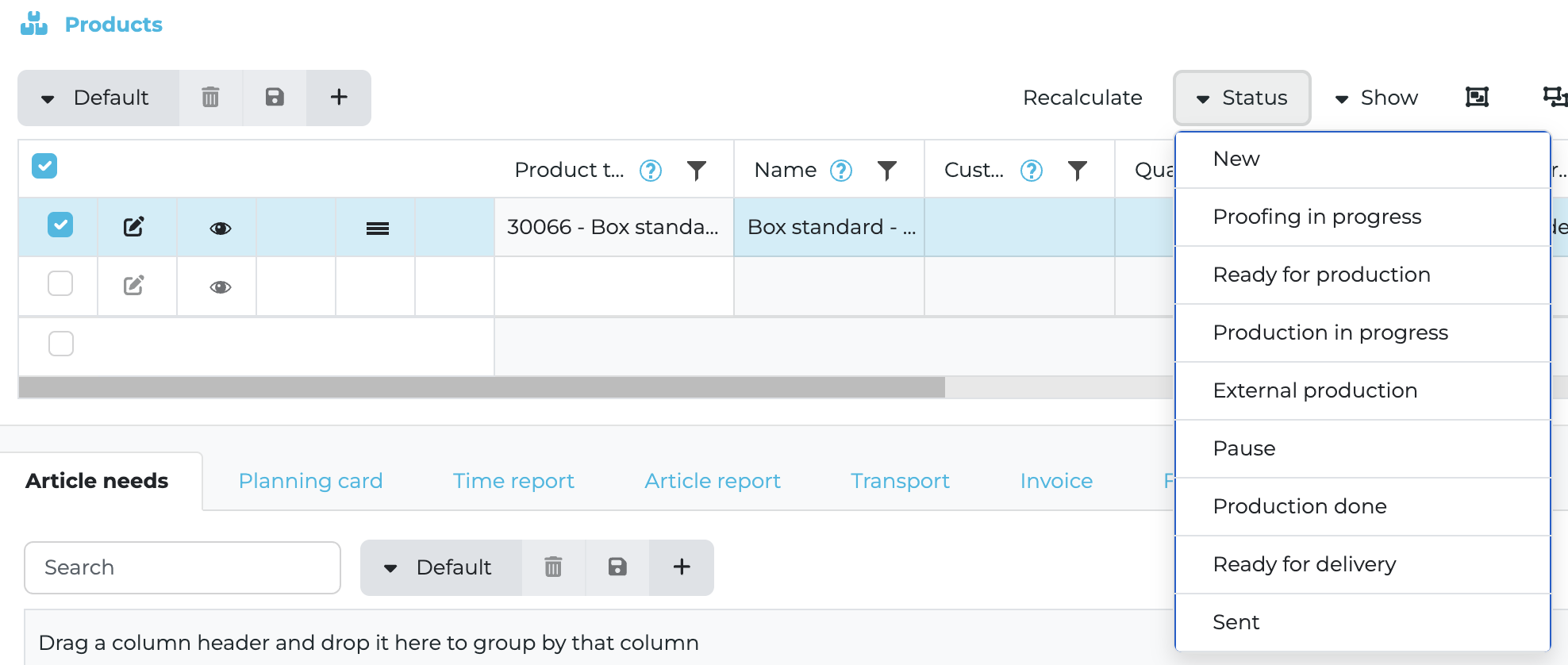
Orders: Proofing in progress
Webhooks and public API
New webhook topic CreateOrder. Triggers when creating a new order in the UI, via the API, and when converting a quotation or order
New endpoints in Public API: PaymentTerms and DeliveryTerms. You can add and delete
Payment terms in API now support day calculation from today or from end of month. Useful for correct expiration date
Transport endpoints extended. You can add a transport on an order via the API
Articles, stock, and Excel
Excel support for articles has been rearchitected. You can export and import using the same template. Remove a column in the file to avoid updating that field. Import shows precise errors and line numbers

It is possible to add a new article need without specifying an article. The unit will be pieces
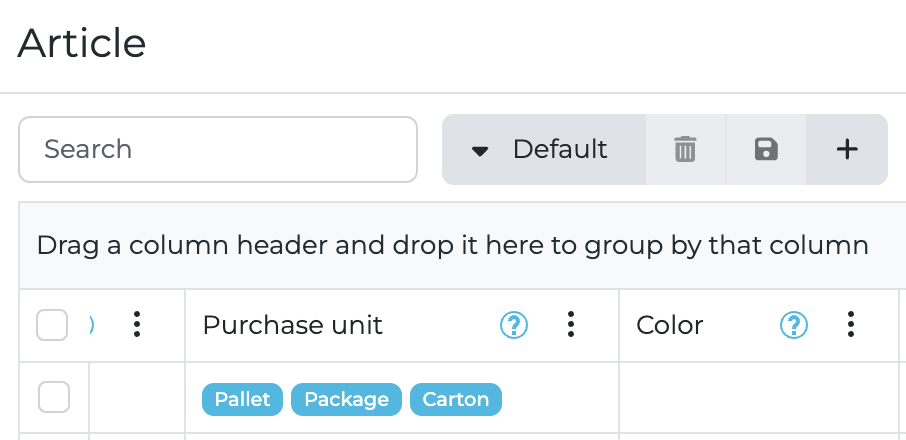
Purchase unit in the article list uses badges for easier filtering and searching. It updates automatically when changing article data in the UI, API, or Excel
Tip
When importing articles with the shared Excel template, export first to get the latest structure. Edit only the columns you want to change, remove the rest, then import.
Pricing and VAT
Markup behavior on a product is updated. If you set a gross price by price list or manual input, the system calculates the markup and sets it to read only
VAT accounts now allow custom VAT rates instead of a fixed dropdown
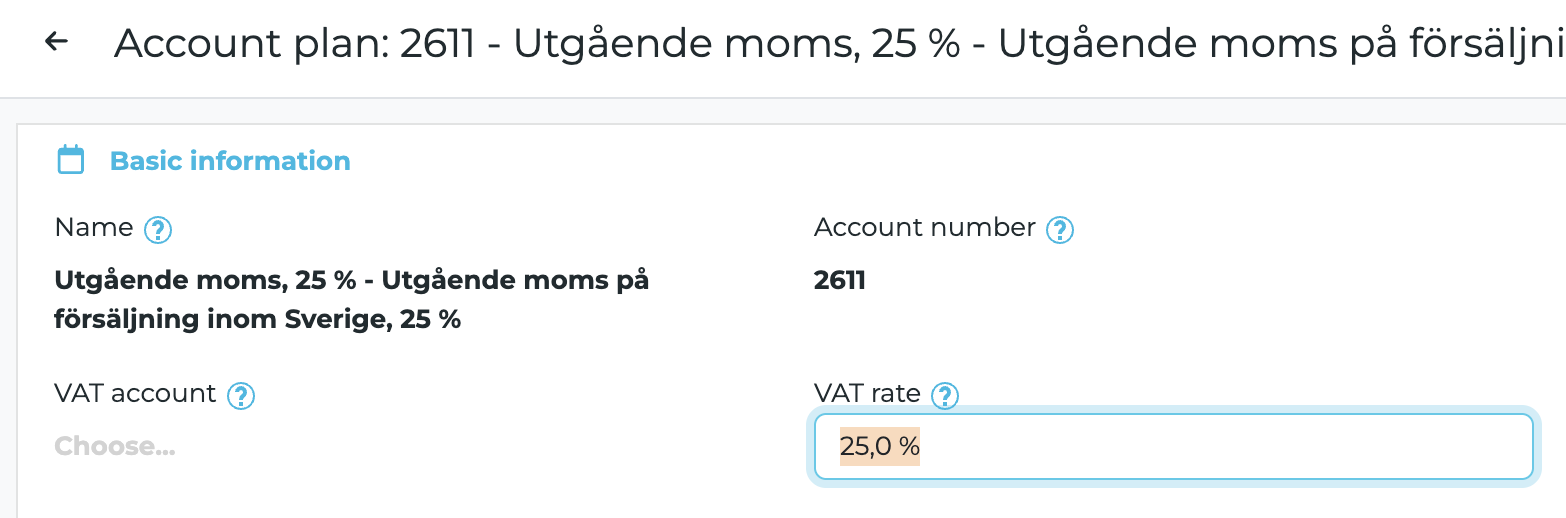
Important note: Custom VAT rates outside the former standard set are handled correctly in custom reports only.
Core reports do not support them.
Core reports do not support them.
Files and views
The Files tab now supports search, filter, and saving views like the other tabs
Planning and performance
Planning card list performance has been improved
Translations and UX
Separate translation keys for Transport sent and Order confirmation sent on orders for accurate wording
Tags are presented in alphabetical order
The option for custom product format in the dropdown is translated correctly
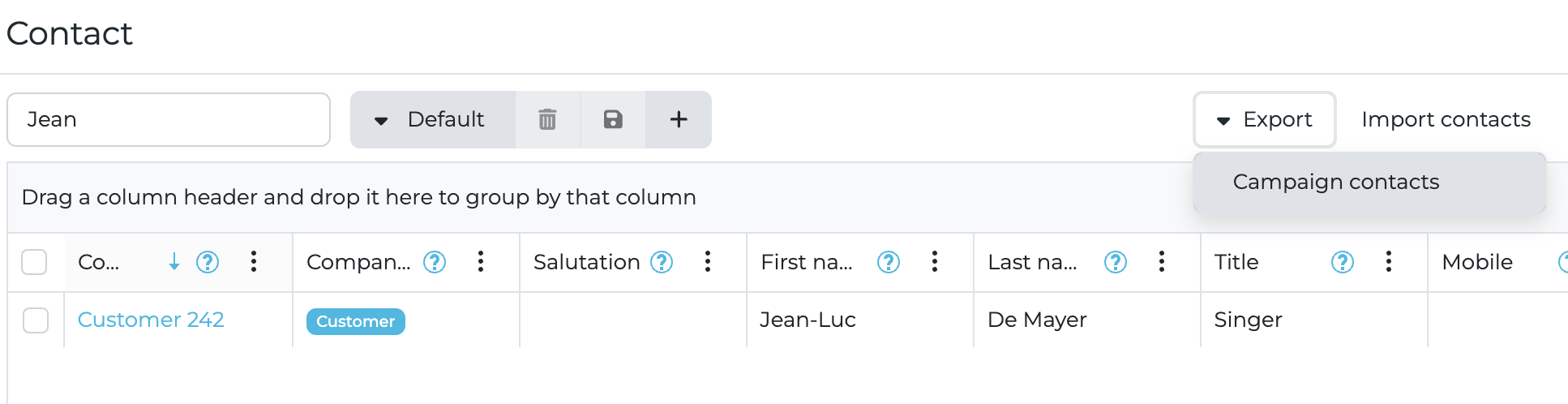
Campaign support. You can set a favorite campaign address on the company card and export a campaign list from contacts that includes selected contacts
Fixes
Reservation is not affected by negative article consumption reports
Global tag is migrated correctly when converting between quotations and orders
Overwriting a selected work object when adding an order via the API is fixed
Tiered pricing works for product templates with product groups
Available quantity and stock requirements calculate correctly when stock balance is zero
Plus additional minor fixes and adjustments.
New Release: 2025-07-27
The latest release introduces a series of powerful enhancements to help you work smarter and faster:
New columns in the Article Needs list
Aggregated values and export options in Article Reports
“Ignore Planning” toggle for selective operation planning
Enable/Disable icon in Product section for custom report visibility
Improved Post-Calculation endpoint and Project Card with rich text
New reports: Material for order and Material in stock
Better transport handling, cost rollups, and unit visibility
Plus a variety of minor fixes, usability updates, and performance tweaks.
New columns in the Article Needs list
Article tag – Helps to filter relevant articles when preparing a job.
Available quantity – Displays how much is currently in stock.
Planned delivery – Shows when the order is scheduled to be delivered, helping prioritize preparation.
Improvements in the Article Report
Aggregates have been added to the bottom of the columns:
Intake
Production
Delivered
Price
Cost
Export functionality:
Excel
PDF
New features and adjustments
A new switch has been added in the operation details for “Ignore planning”. If set to “Yes”, that operation will not be planned.

Price per square meter has been added as a key figure in the quotation, order, and product summaries. It shows the calculated price per m² of the final product format.

Cost column aggregation has been added to the time report list.
Transport type (Internal/External) is now handled more clearly:
Internal transports do not generate invoice rows.
They are not included in the total price.
Type is included in all report API endpoints for use in custom reports.
Custom sheet format is re-calculated if you change the material on the product. This is because new materials might have different base formats. You can preserve the current format using the lock icon to prevent recalculation.
Post-calculation and Project Card
The Post-calculation endpoint now provides complete data for comprehensive reporting.
The Project card has been enhanced with tabs for:
Quotations
Orders
The description field now supports rich text formatting.
Improvements to the “Addressing” Operation
Custom quantity is now supported and is considered when calculating number of passes and full operation cost.
New Reports
Material for order – Shows the articles linked to a product. Mainly used for printing labels when material is sorted and ready for production.
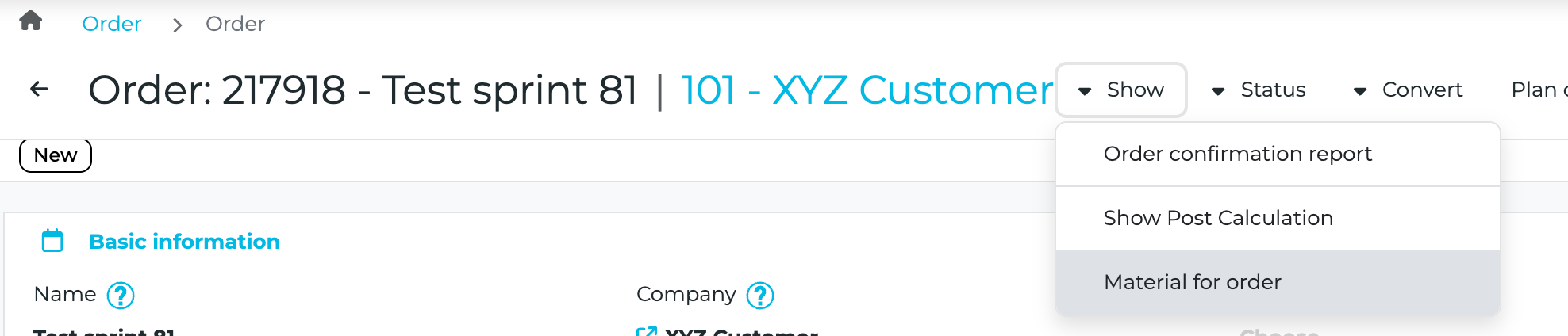
Material in stock – Displays article information. Used for labeling material in warehouse storage.

Product Improvements
An Enable/Disable icon has been added to the Product section, allowing users to hide or show a product line in custom reports.
The position of the Warning and Clone icons has been adjusted.
Other Improvements
Grouping now updates correctly when switching between favorite views.
The GetOrder public API endpoint no longer includes deleted orders.
Incorrect tooltips in the product tab have been fixed.
Standardized display of articles.

Tags are now included in Excel exports.
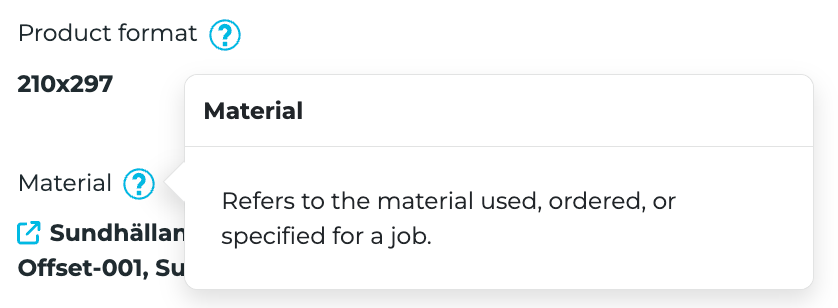
Help icons (❓) now appear next to all form fields. Click to see translated explanations.
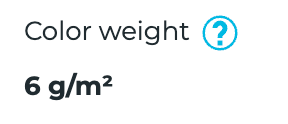
Units have been added to form fields (e.g., mm, m², kg) to clarify the meaning of entered values.
Plus additional minor fixes and adjustments.
Looking ahead: A Major Leap in Product Workflow & CAD Integration
We are working on groundbreaking enhancements to streamline repetitive orders, integrate directly with CAD tools, and empower users with dynamic resources, customisable attributes and visualised production flows.
Resource – The product-oriented workflow will enable handling of repeat orders for standardized products. We will transform articles into resources, offering a more generic and flexible structure. Resources can be categorised using resource classes that reflect your own terminology and business logic. A resource can represent anything from raw material, production tools, semi-finished goods, to finished goods with or without warehouse management. Resources can be either produced or purchased.
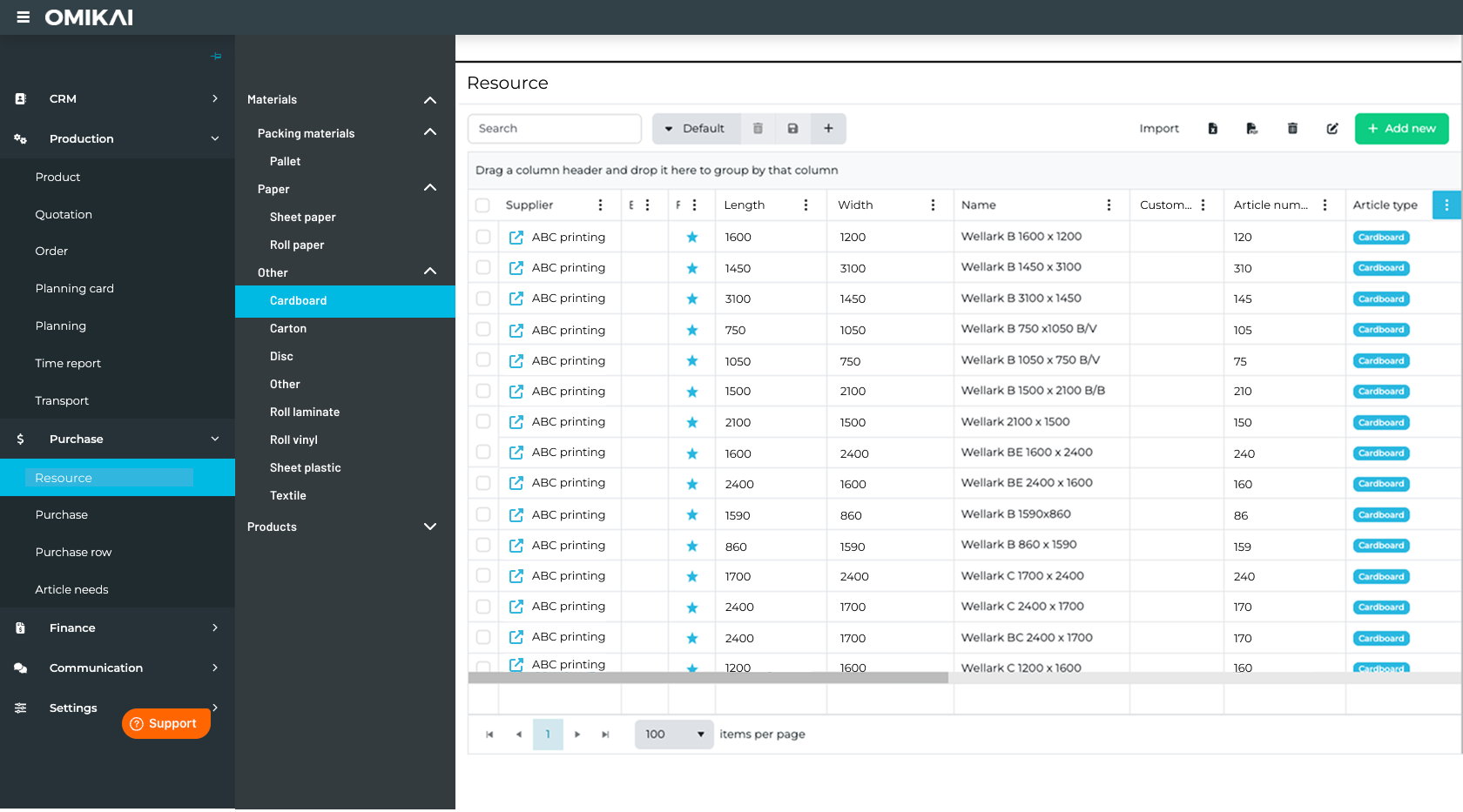
Attributes – Users can define their own custom attributes on a resource or resource class using preferred aliases. This allows customization of resource data per account, making it scalable and business-specific.
Sales Orders – To complete the product-oriented workflow, we will introduce the concept of Sales Orders. A streamlined way to register orders for pre-calculated products, significantly speeding up the process of handling standardised sales.
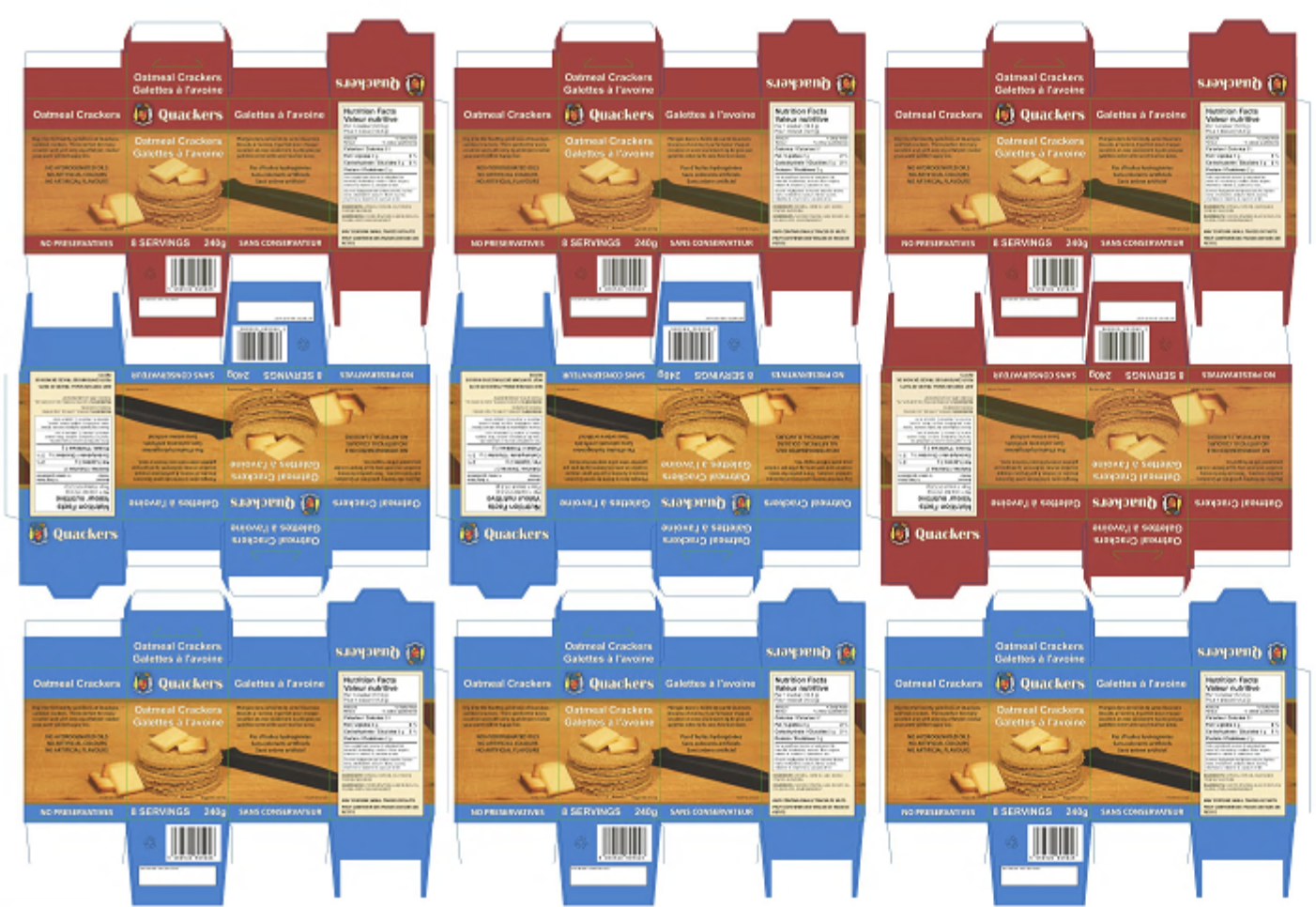
CAD/Layout integration – The CAD integrations will allow seamless connections with common CAD and layout systems in the market. It will enable you to automatically create an optimal layout based on the standardized shape of a product.
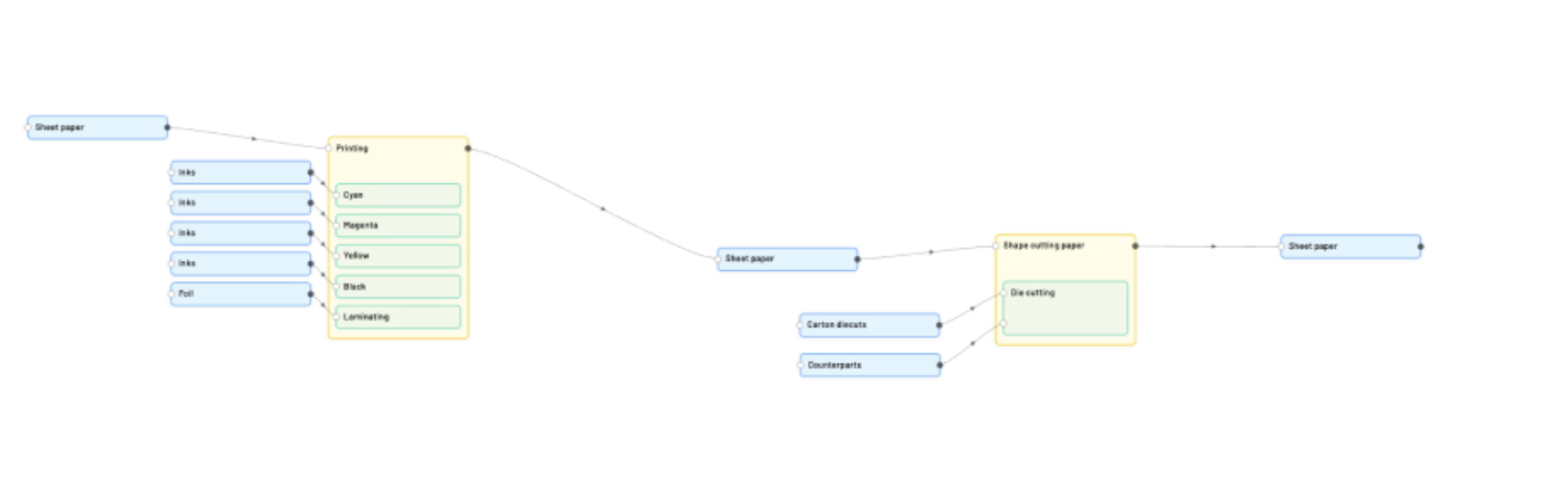
Production flow – We are also working on a new type of calculation engine to complement our existing one. The new engine will be a visualized flowchart of all included work steps required to produce a product and how they are connected into a production workflow. We call it “Production Flow”.
This represents a significant breakthrough and milestone in OMIKAI’s journey and will provide great new value for all industry segments, including commercial print, packaging, and label.
More information will follow.
2025-06-29
We have added new fields on Profile.
The new fields are
Payment terms
Terms of delivery
Report settings
The new fields are taken in consideration when a new quotation or order is created. The priority of where the data for these fields are taken from follow this priority
1. Company card
Profile on the quote/order
Account
We have added new columns in the planning card list. The new columns are:
Sales manager
Project manager
Calculator
We have added KeyFigures in the Report API. It is now possible to show KeyFigures like Co2, Product weight etc in custom reports. The effected endpoints in the Report API are:
Quotation
Order confirmation
Invoice
We have added a new field for Grain Direction in the article list and article card. This will show long grain or short grain depending on the fiber on the specific article.
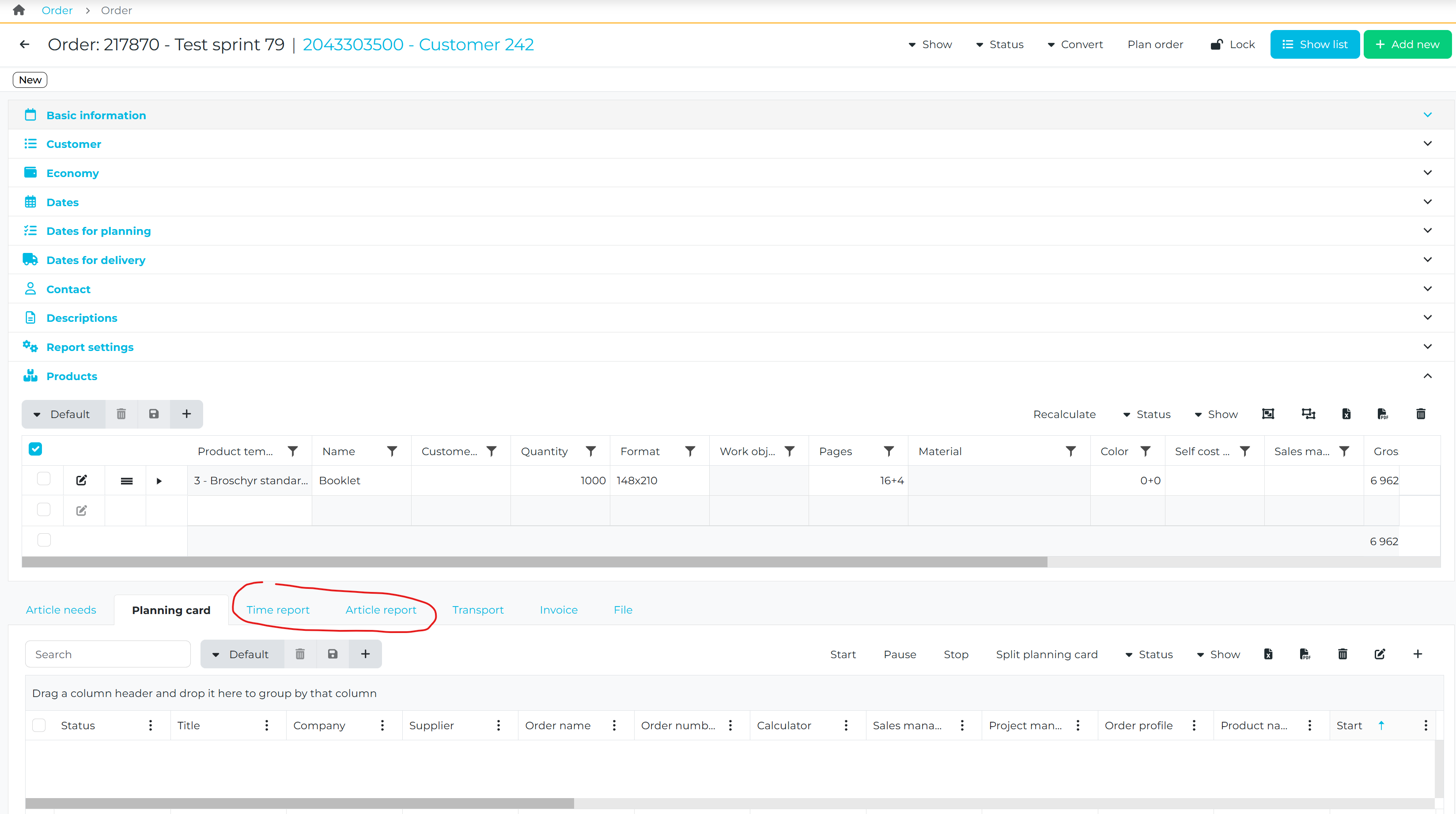
Time report and article report are added as new tabs on the order card. This makes it possible to see all reports directly on the order card without being forced to open each planning card.
User and date is added as new columns on article reports.
An issue where the cost was not updated when the time was changed on an existing time report is now fixed.
We have added all operations on top level in the Endpoints for Quotation, Order confirmation and Invoice in the Report API. This makes it possible to display all operations in a custom report if needed and not only the ones from the top product.
It is now possible to report negative consumption in the wizard for shop floor data collection. This is very useful if an operator wants to return material to stock that has already been withdrawal.
We have added a new field for SKU in the product template register.
A big adjustment has been done for reporting of time and articles. Now all reports are related to the operation and not to the planning card.
Exemple:
Exemple:
You have an order with a print operation
You plan the order
You split the print planning card into two planning cards
You do a report on one of the planning cards
When you look at the other planning card you will see the consumption from the previous planning card
When you look at any of the planning cards you will se both reports
We have added a new column for Product name in the wizard for shop floor data collection. This is important in situations where you batch report planning cards with the same type of operation.
An issue where the dates on a transport was mapped wrong for the delivery note Endpoint in the Report API is now fixed. All custom reports will now show the correct date for planned delivery and planned arrival based on the transport and with a fallback on the dates set on the order.
Folding method has been added as a new condition in the performance table for folding machines. This makes it now possible to create different performance on a folding machine based on the folding method used in a calculation.
The default subject in an email is now translated to the current language setting.
An issue with selecting rows in all lists when using the system on some types of tablets have now been fixed.
A big improvement has been done on the performance in the article needs list.
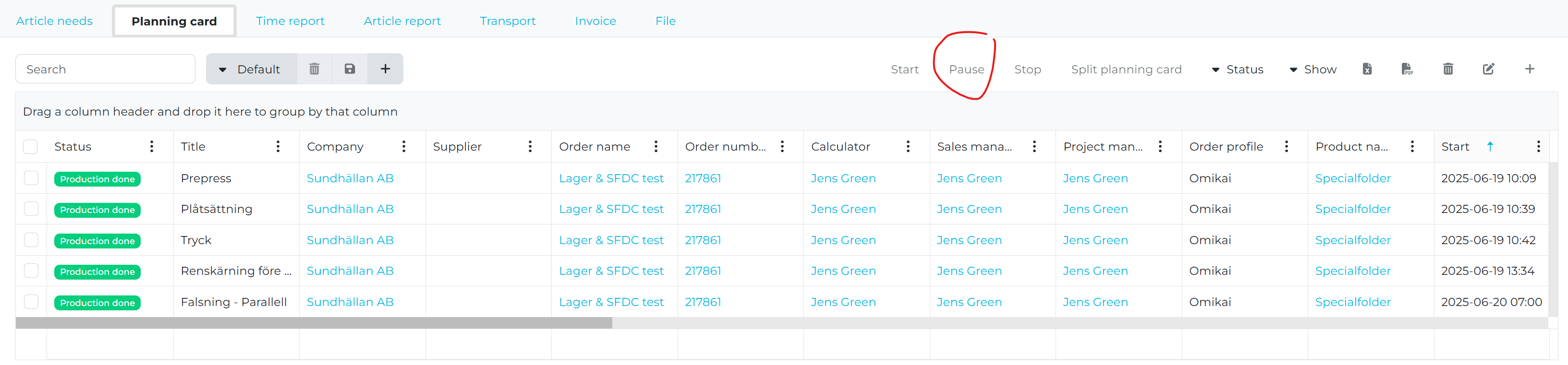
We have added the possibility to pause a planning card in the planning card tab within an order.
We have updated the action and report setting for post calculations on an order card. This means we will be able to start to roll out custom post calculations.
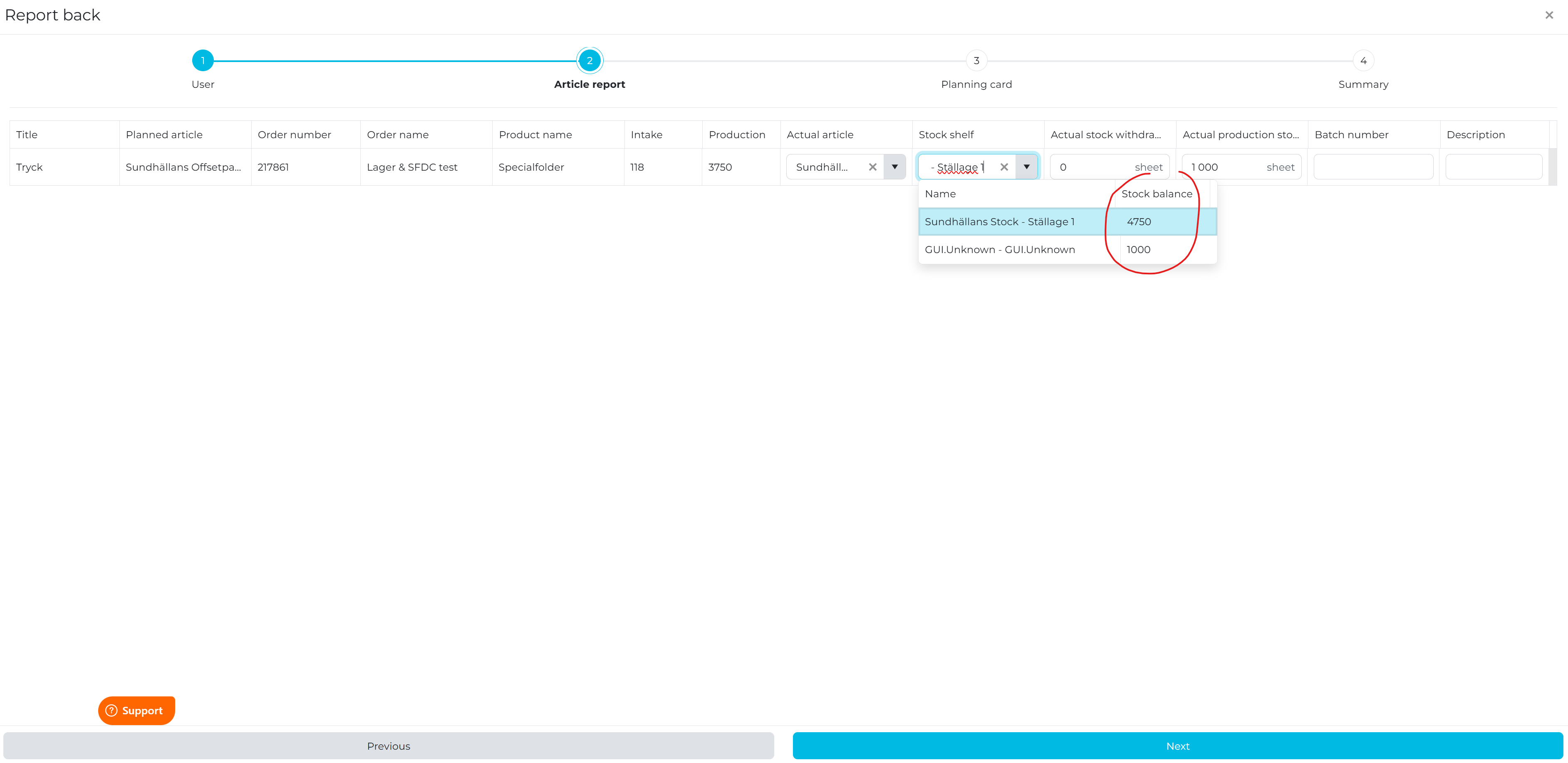
We have added a new column for stock balance in the shop floor data collection.
The font has been updated so languages using other alphabets then Latin are displayed correctly.
Transports related quotations are now not shown in the transport list.
We have added a new Endpoint for updating planning cards. This makes it possible to update planning cards via a third party system or external integration.
Plus additional minor adjustments and fixes.
2025-06-09
Important information about system updates in OMIKAI 2
Releases on Monday 2025-06-09
Releases on Monday 2025-06-09
NOTE! Dont forget to clear the browsers cache by pressing ”Shift + F5” on PC or ”Command + Shift + R” on Mac, or in the browsers settings so the updates will have the correct display and functionality.
It is now possible to relationships between quotations, orders and invoices
Quotations converted to orders shown on the quotation card
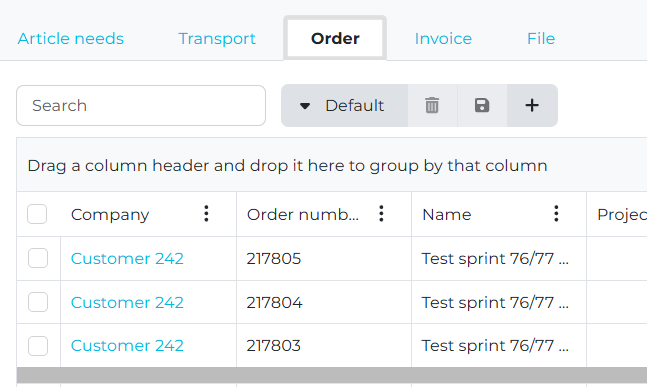
Quotations converted to orders and then converted to invoices shown on the quotation card
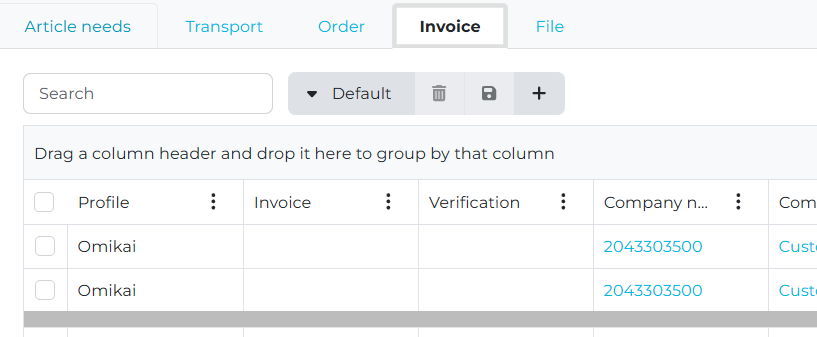
Orders converted to invoices shown on the order card
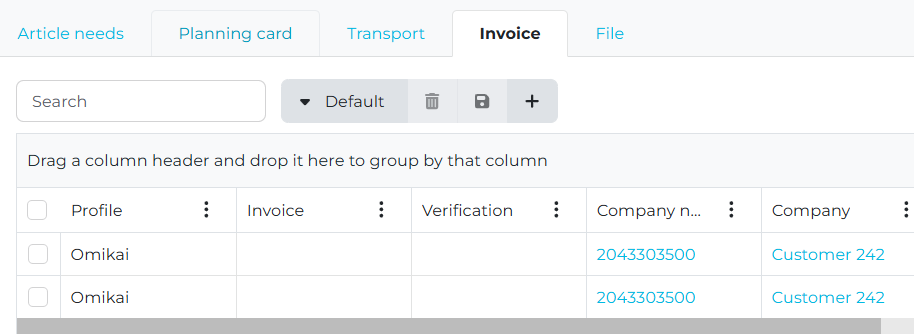
Orders converted to invoices shown on the invoice card
The Report API has been extended
We now show Tags on all levels in
Quotation
Order confirmation
Invoice
Delivery note
Work order
We added custom name on article in
Quotation
Order confirmation
Invoice
The BI API has been extended
Profile is added in
Quotation
Order
Invoice
Time report
Article report
The supplier of the Actual Article is added in
Article report
This is also added in the BI API.
This will make it possible to create dashboards including sales and production targets.
More information about how this will be implemented will be notified further on.
This will make it possible to create dashboards including sales and production targets.
More information about how this will be implemented will be notified further on.
Operation quantity has been added as a new condition on die-cutting machines. This will make it possible to create performance settings depending on the quantity being die-cutted.
A problem where the first planning card was not always set to ready on products with parent and child products has now been fixed.
A new endpoint for Add and Update products has been added to the public API.
A big update in the UI has been made so the product list and the operation list is now always visible. This will make it possible to see Products, Operations and Article needs at the same time.
IMPORTANT: You have to reload the page to see the new UI
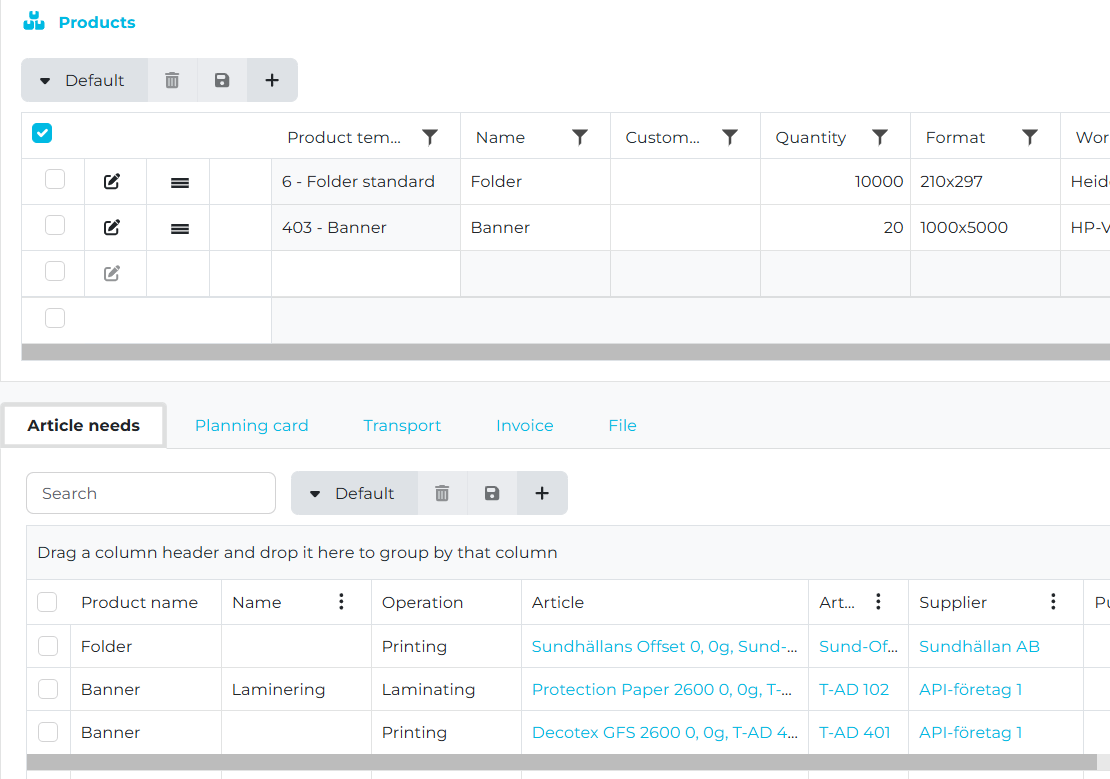
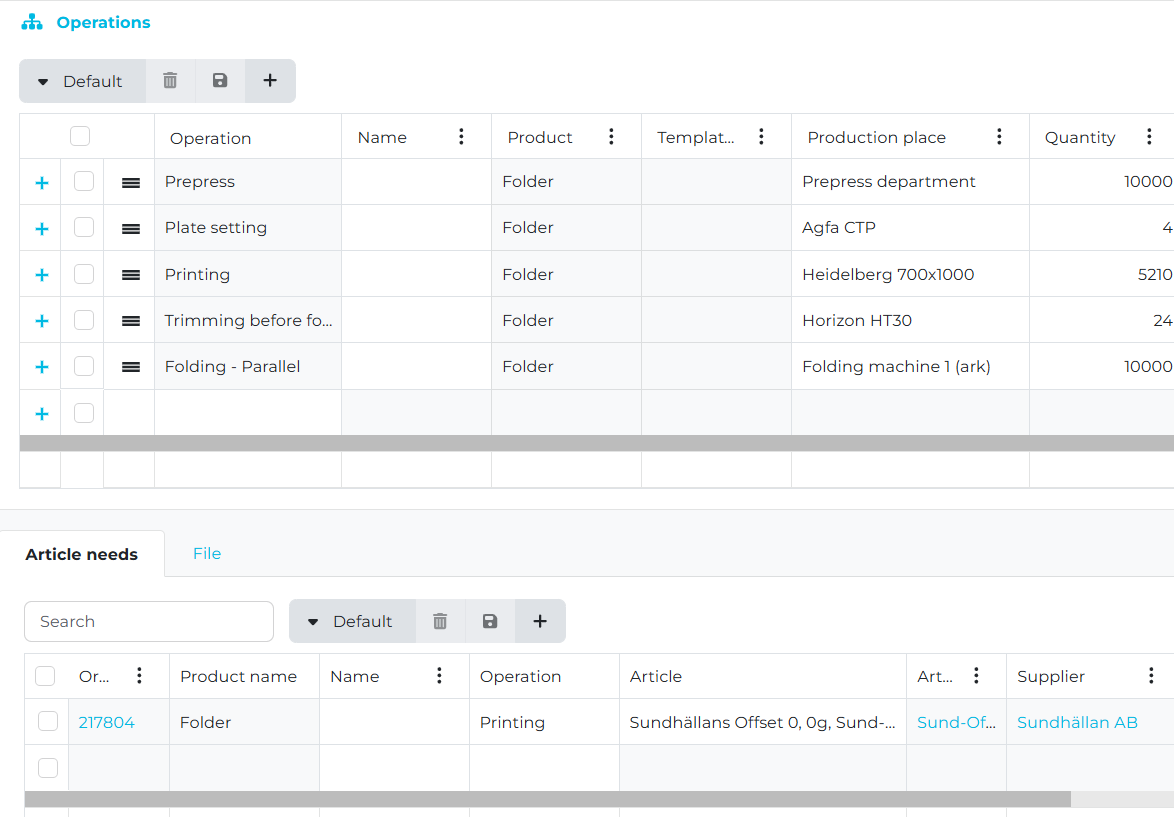
We have done changes in the planning engine and now we ignore planning cards with status Done. This means that the planning can place new planning card at the same time as another planning card as long as that planning card is already done.
We introduce a completely new concept for forecasting. It is now possible to create forecasts for:
Sales
You can add multiple sales forecasts where each forecast is specified with
Name
The unique name to identify the forecast.
The unique name to identify the forecast.
Valid from
The date from when the forecast should be valid from.
The date from when the forecast should be valid from.
Valid to
The date from when the forecast should be valid to.
The date from when the forecast should be valid to.
Here you can specify your specific forecasted sales per
Date
The date where this forecast row will be valid from.
Here you can specify a forecast row per week, month, year etc. This is how you can specify the level of detail in your forecast.
The date where this forecast row will be valid from.
Here you can specify a forecast row per week, month, year etc. This is how you can specify the level of detail in your forecast.
Sales manager
Company
Sales manager
Product template
Amount
The sales target amount
The sales target amount
Here is an example of a forecast where we have specify
Sales target for 30 000 for the customer XYZ Customer for sales manager Lars Larsson
Sales target for 40 000 for the customer XYZ Customer for sales manager Mats Eriksson
Production
You can add multiple production forecasts where each forecast is specified with
Name - The unique name to identify the forecast.
Valid from - The date from when the forecast should be valid from.
Valid to - The date from when the forecast should be valid to.
Here you can specify your specific forecasted production per
Date -
The date where this forecast row will be valid from.
Here you can specify a forecast row per week, month, year etc. This is how you can specify the level of detail in your forecast.
The date where this forecast row will be valid from.
Here you can specify a forecast row per week, month, year etc. This is how you can specify the level of detail in your forecast.
Work object
Speed
The production target speed for the selected Work Object for the selected period
The production target speed for the selected Work Object for the selected period
Availability
The production target availability for the selected Work Object for the selected period
The production target availability for the selected Work Object for the selected period
Performance
The production target performance for the selected Work Object for the selected period
The production target performance for the selected Work Object for the selected period
Quality - The production target quality for the selected Work Object for the selected period
This is also added in the BI API.
This will make it possible to create dashboards including sales and production targets.
More information about how this will be implemented will be notified further on.
This will make it possible to create dashboards including sales and production targets.
More information about how this will be implemented will be notified further on.
New key figures has been added in the summary for quotation, order and product. We now show KPI's for
Product weight
Product thickness
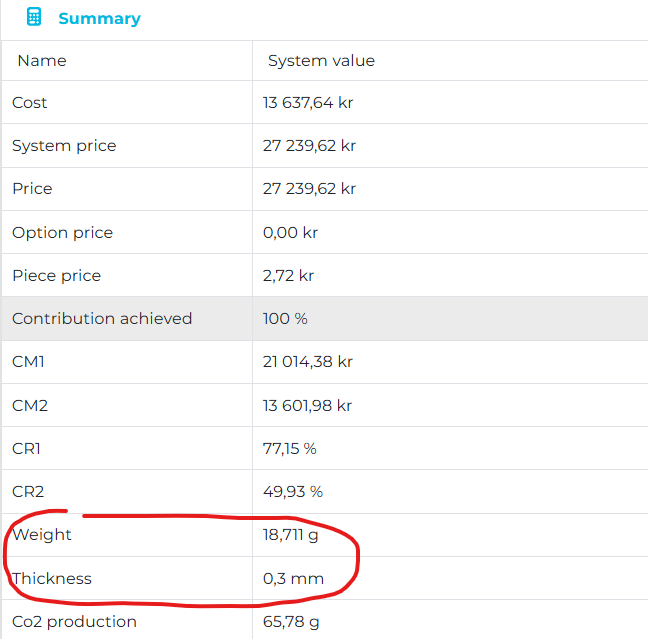
Article reports can now be shown in a new list from the main menu. This will show all article reports for all planning cards making it possible to get an overview of all reported consumption of material in one place.
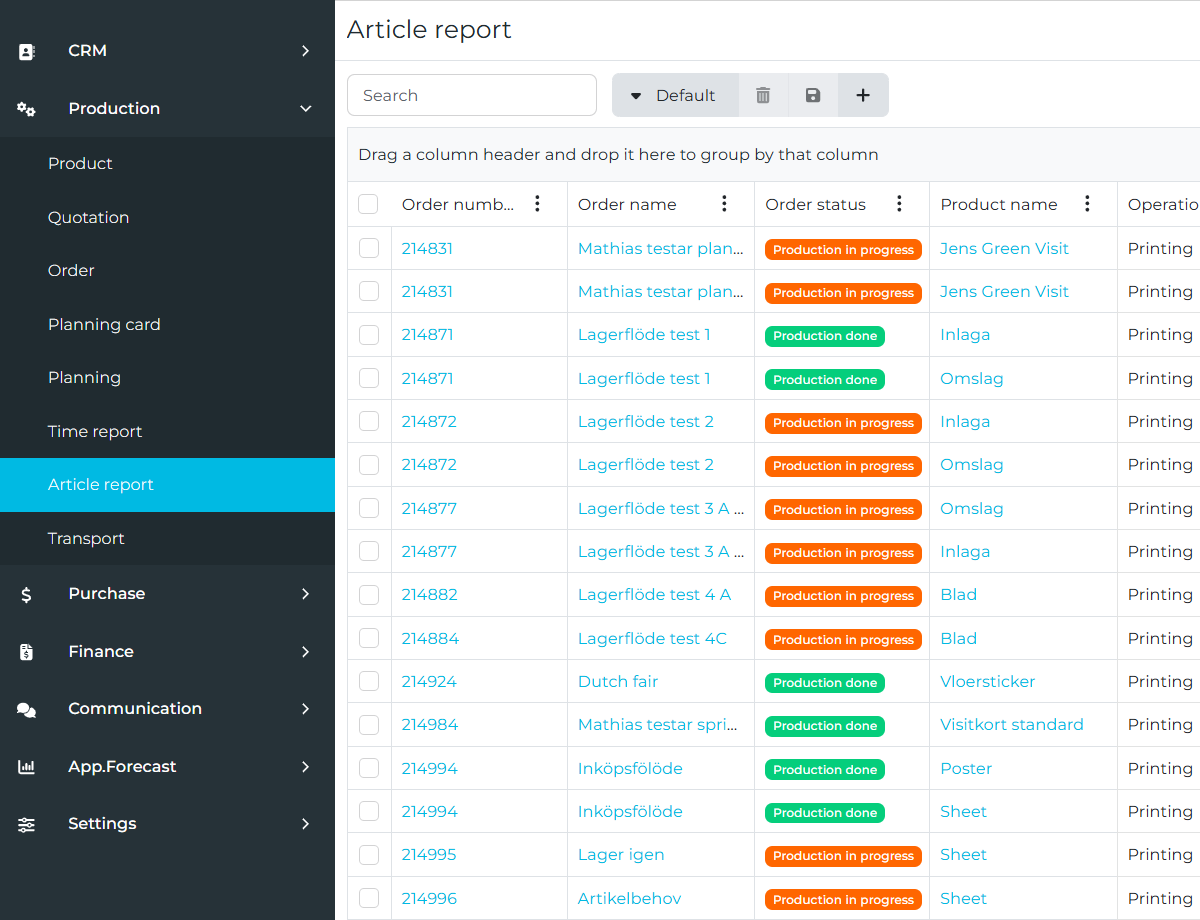
We have added new endpoints for Cut-Down formats in the public API. This will make it possible to create your own unique list of these formats for each account
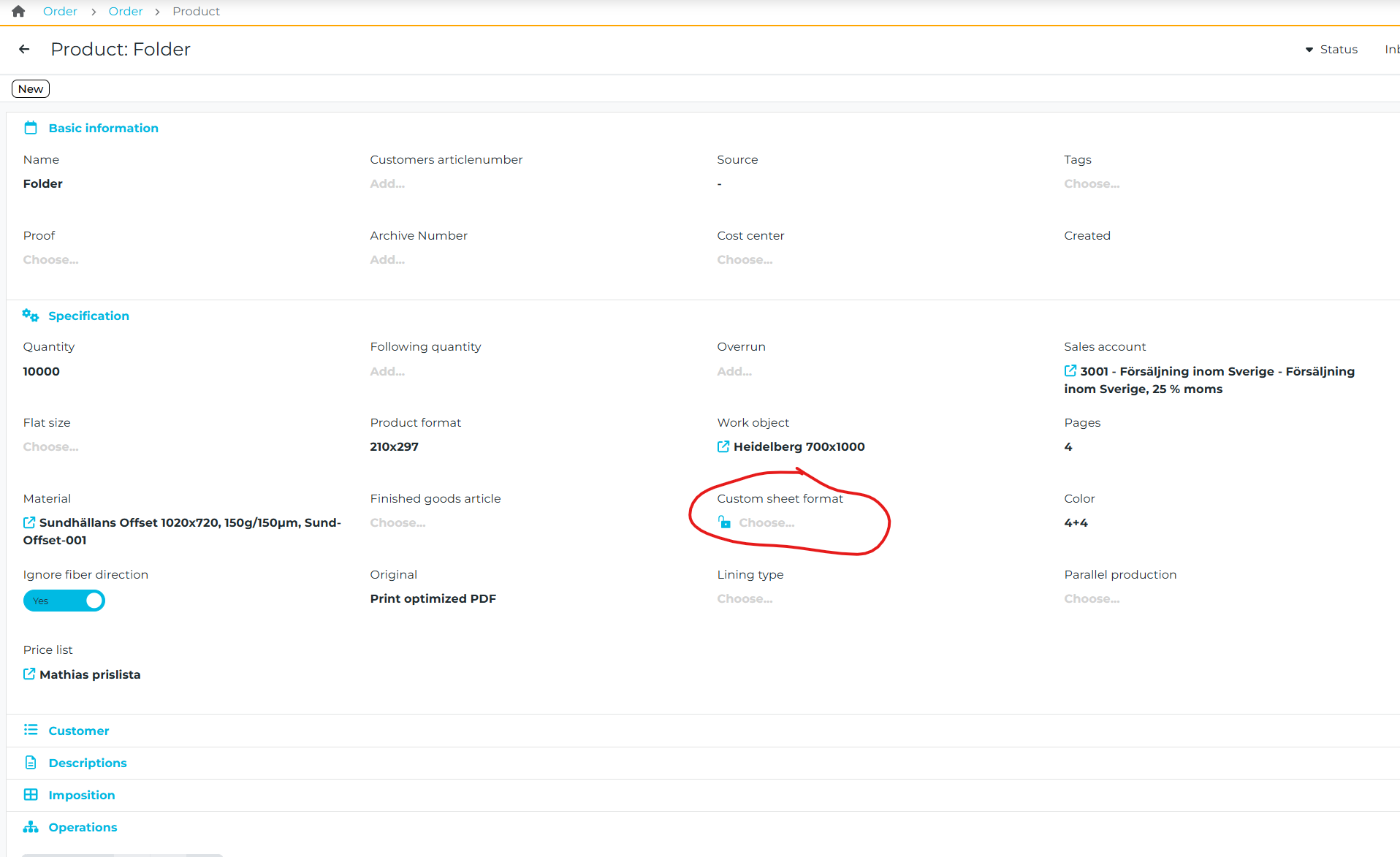
We have added new endpoints in the public API for updating invoice. It is now possible to update the status of an invoice. This could be very important when making financial integrations to update the status of an invoice after synchronization.
We have made adjustments of the profitability key figures in the summary for quotation, order and product. In some situation they could be calculated wrong but this has been fixed. This will effect:
Cost
System price
Price
CM1
CM2
CR1
CR2
We have added additional filters in the planning scheduler for supplier. This is very useful when working with subcontracting of part of and order or a complete order.
It is now also possible to make tags for invoices.
It is now possible to specify multiple receivers of emails on a customer card.
Here we have specified that all order confirmations should by default be sent to two different email addresses. You specify thisby using a ; to separate the emails.

Here we have specified that all order confirmations should by default be sent to two different email addresses. You specify thisby using a ; to separate the emails.
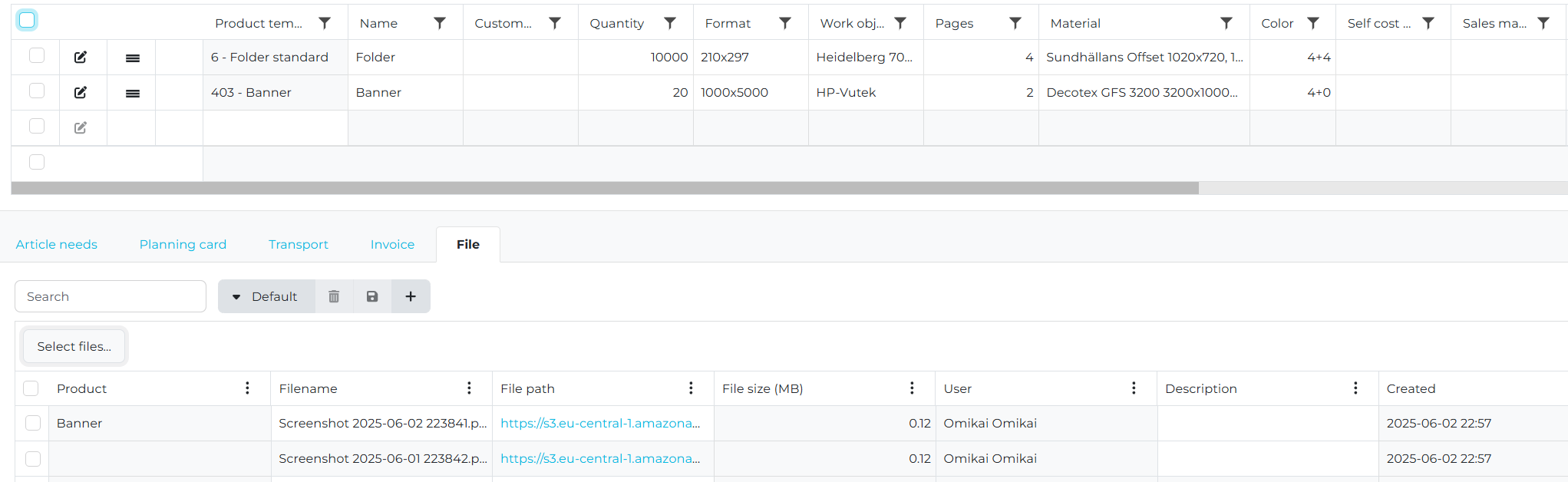
It is now possible to get an overview of all files on a quotation/order and on any of the products or their child products. In this example you see 2 files. One uploaded on the product Banner and one uploaded directly on the order. You can see both in the same view on the order card.
We have done general and specific work to improve performance and behavior in the system:
When searching in a list the input is handled better. In some situations some input could be ignored because the search was executed. Now the search is put on hold until you stop writing.
The lists that has been improved are:
Article need - 50% performance improvements.
Quotation and Order - 75% performance improvements.
Planning card - 33% performance improvements.
Planning scheduler - 50% performance improvements.
We have done changes how inks are handled when specified in the ink dialog.
If you specify inks of type varnish we will:
If you specify inks of type varnish we will:
Not creating printing plates.
Will not be included when calculating number of intakes.
The announcement in release 2025-04-22 on how we handle printing plates has now been implemented and will be included in the upcoming release.
For all offset printing presses you will need to create an article for printing plate and select that on the printing press.
Here is an example of a printing plate article
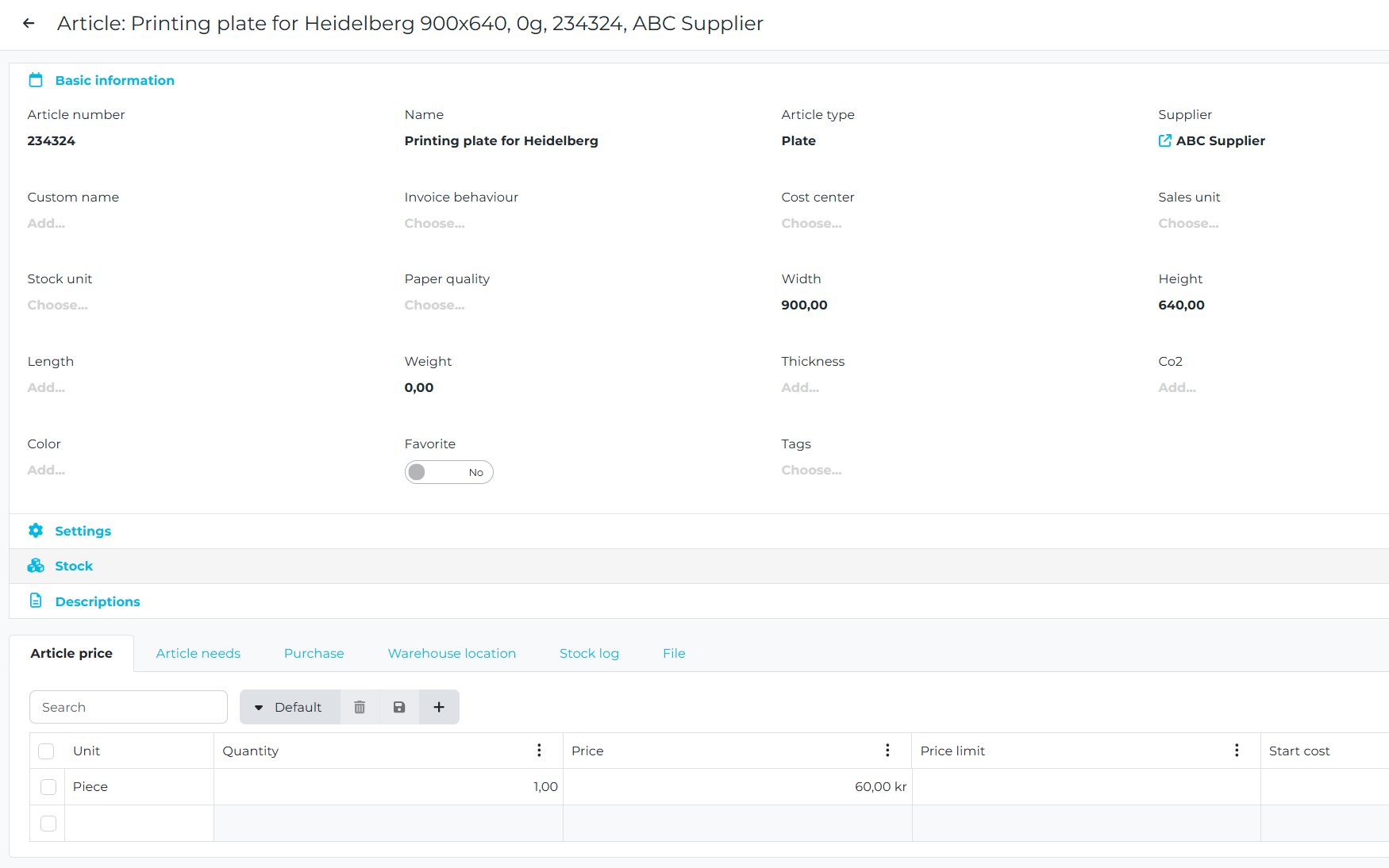
Here is how you specify the printing plate article on an offset printing press
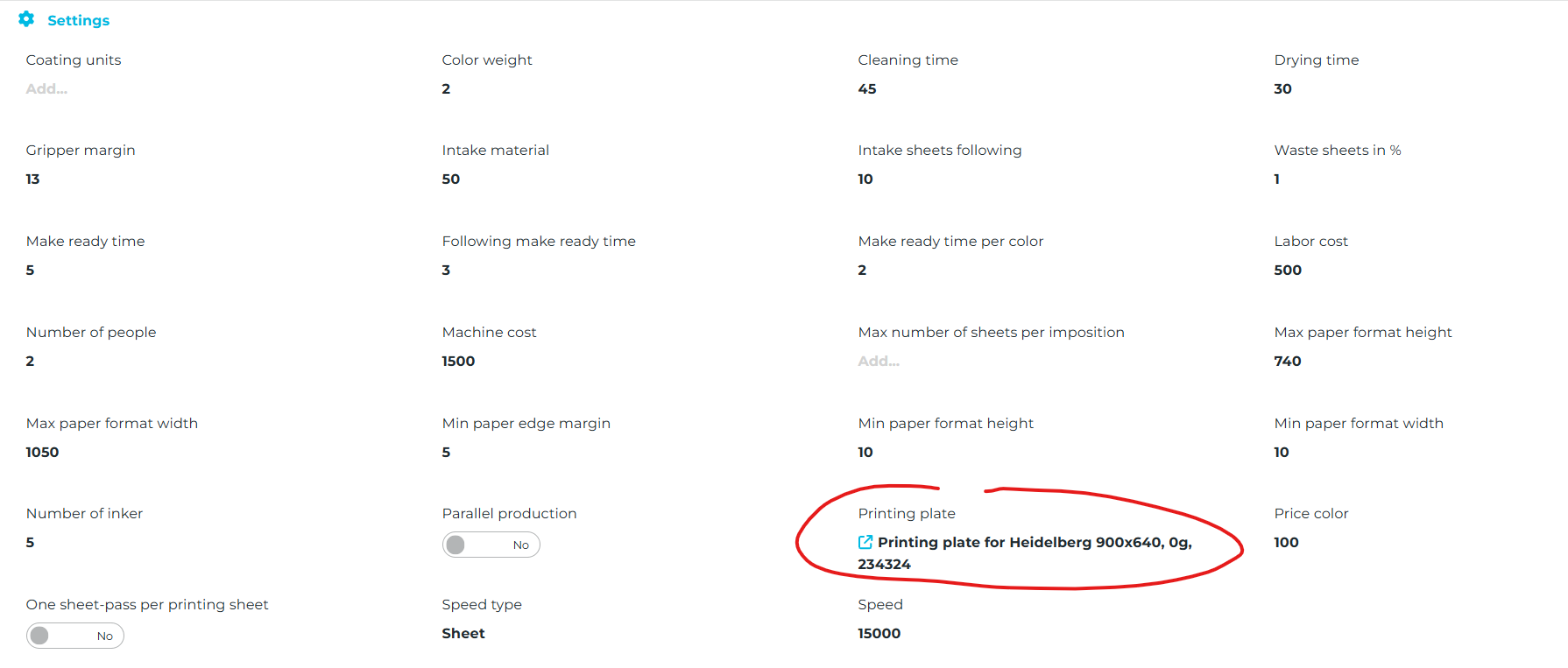
By doing this the system will use the printing plate for the selected offset printing press to create an article need for plates. This will make it possible to have a more detailed calculation of printing plates and also to be able to report any extra consumptions of printing plates in production. Stock management of printing plates will also be handled.
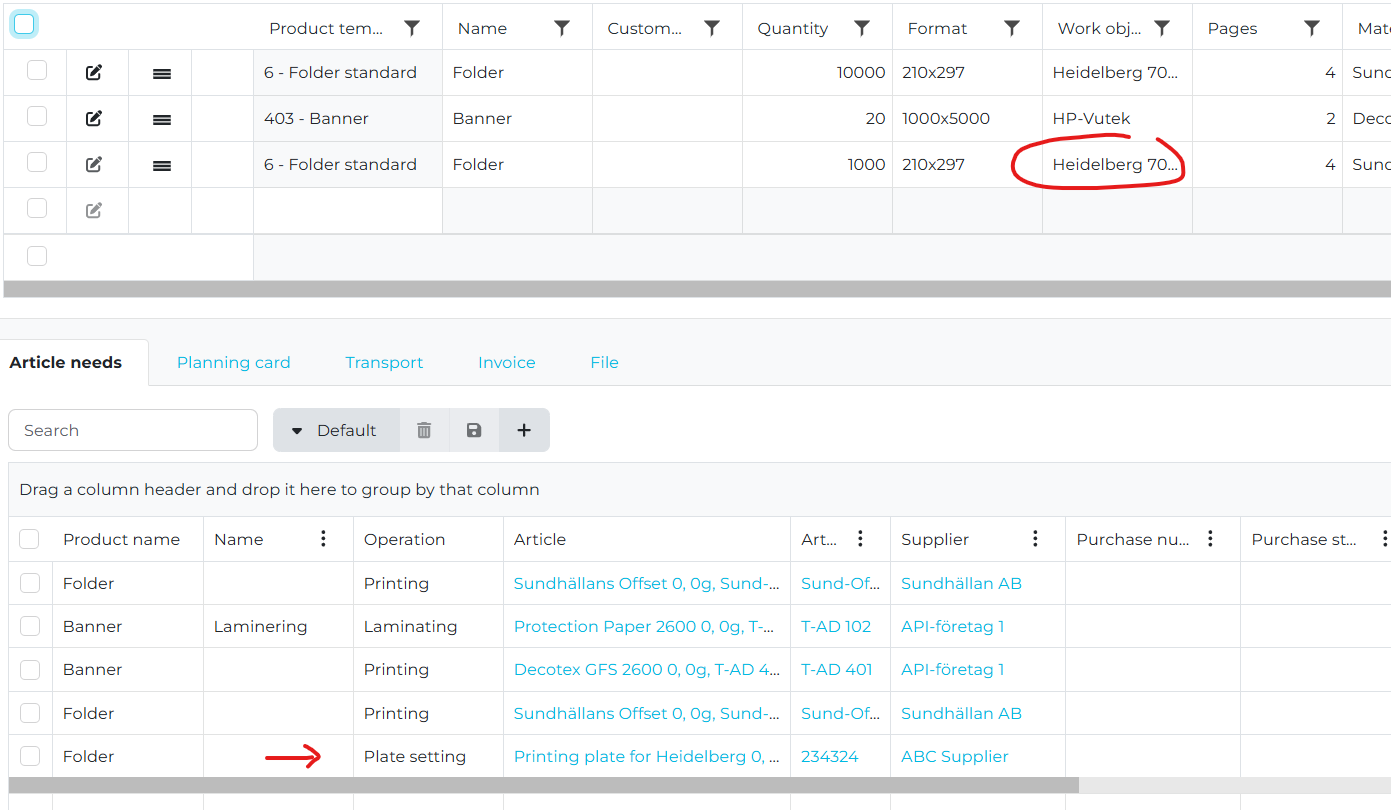
Plus additional minor adjustments and fixes.
2025-05-15
If you have not specified any custom margins in the extension, they are now taken from the account settings as default.
We have made changes in the scheduling engine. When you are planning an order it is now not possible to plan an order in past time. If you have selected an older date the order is then still planned from the current time and onwards.
A problem when the work object on an operation is not updated automatically when it is changed on the product header is now fixed.
A problem when navigating to an order from the article needs tab has now been fixed.
Purchase order number and purchase order status is now shown as new columns in the list of article needs.
A problem when manually added article needs was not shown correctly has now been fixed.
We have changed the way we calculate the actual cost for articles based on shop floor data collection after production. When a report change the article to another used article the cost is taken from the new article but if you report the same article the cost is taken from the pre-calculation. This means it will not be taken from the article it self. If you for example increase the purchase cost for an article between the moment you create the calculation and you do the report after production the cost will not be affected by that.
Plus additional minor adjustments and fixes.
2025-04-22
It is now possible to specify the number of ups of a specific edition on a specific imposition sheet.
In the folding block window you can specify this exactly how you want it. If the information you specify is not possible to plot in the imposition editor it will plot as much as possible but still calculate according to what you specified.
In the folding block window you can specify this exactly how you want it. If the information you specify is not possible to plot in the imposition editor it will plot as much as possible but still calculate according to what you specified.
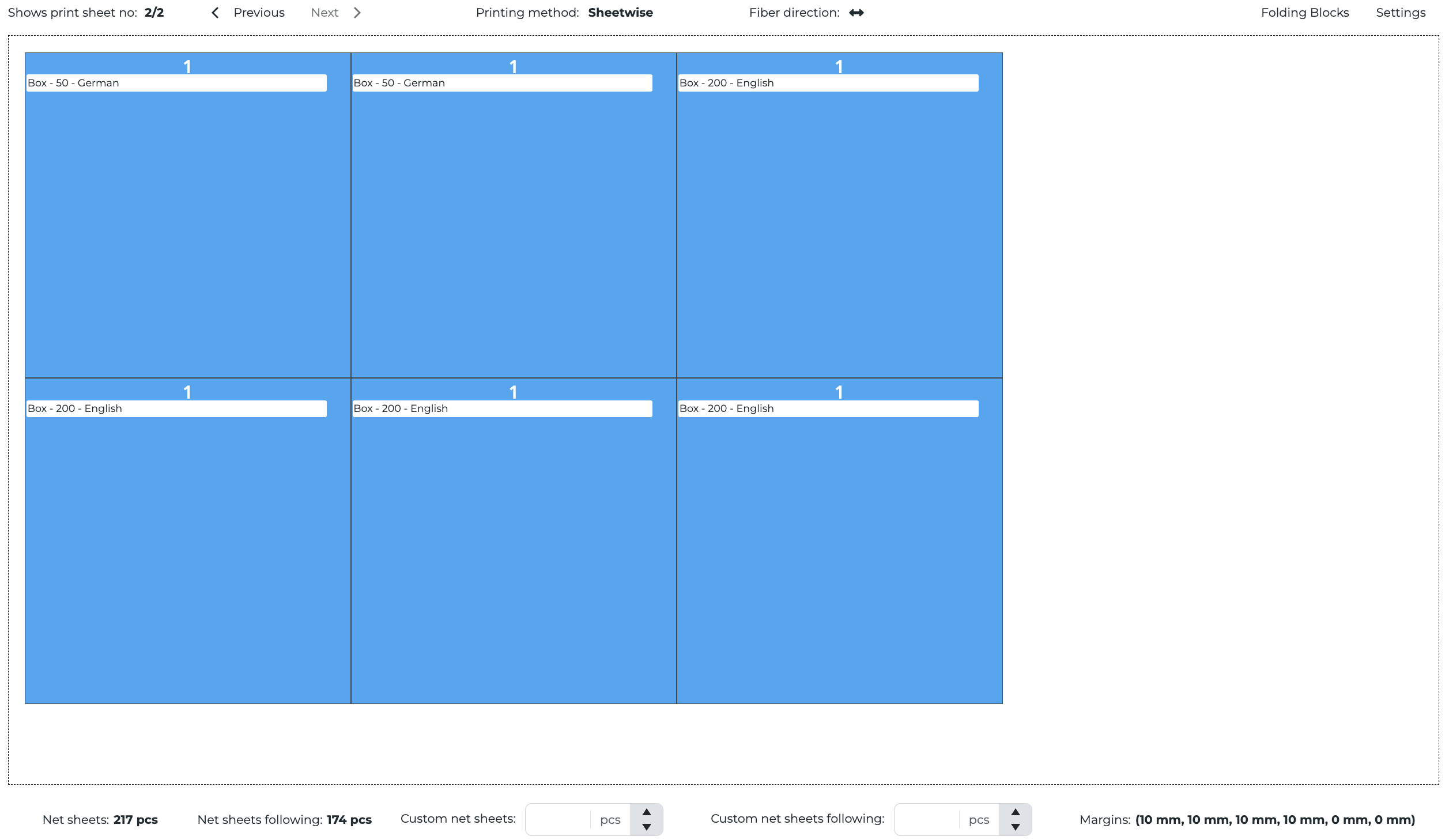
If flat size it 200x200
You will get one imposition sheet with 1xGerman+1xEnglish+4xSwedish by default
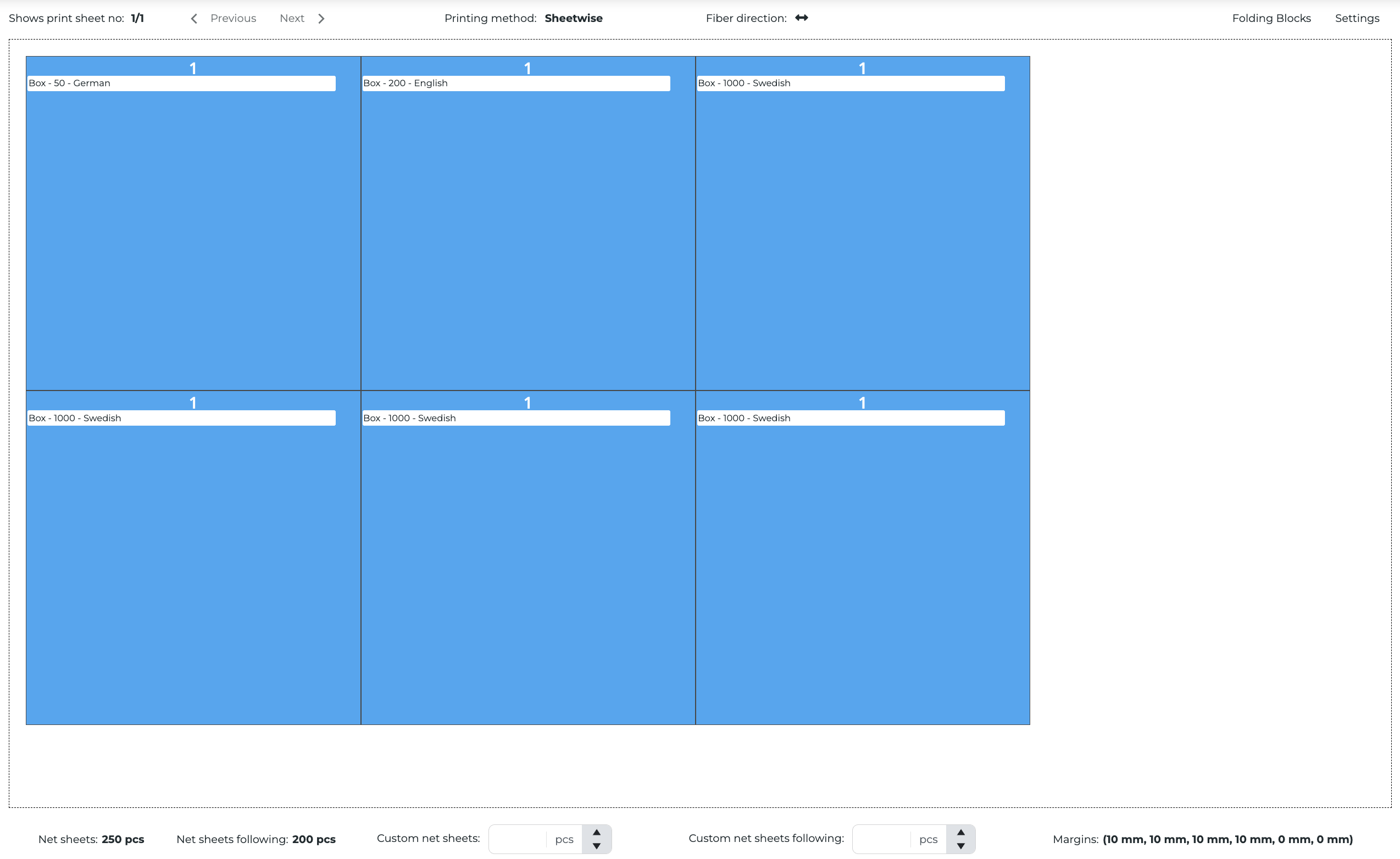
But maybe you dont want that. Maybe you want Swedish on a unique sheet and control the distribution of ups between the English and German you self.
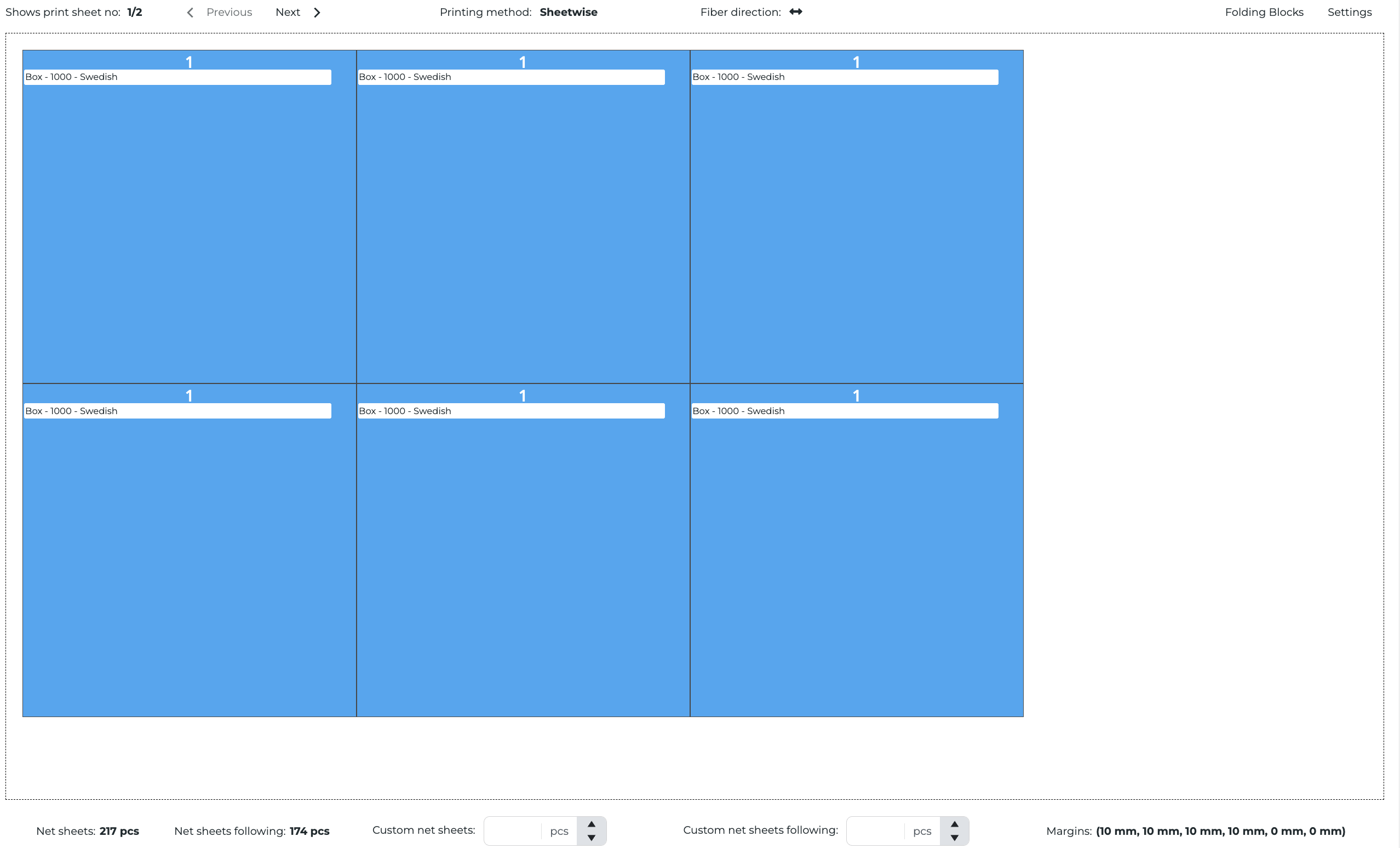
Then you click on the folding block button in the upper right corner of the imposition editor and specify it like this with sheet 1 = 6xSwedish and sheet 2 = 4xEnglish and 2xGerman

Then you click on the folding block button in the upper right corner of the imposition editor and specify it like this with sheet 1 = 6xSwedish and sheet 2 = 4xEnglish and 2xGerman
The 2 imposition sheets will then look like this
When you change the currency, conversion rate and number of decimals on a currency in settings it will now affect the entire system.
In the system you will see all currencies with correct number of decimals

In the reports
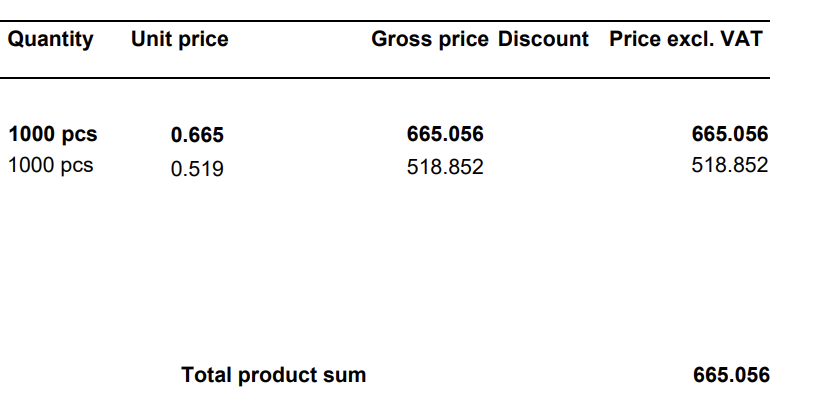
And on transports

Phone and title are new fields on users. These are also included in the Report-API and can be used in custom reports.
Order number, work object and planned production date are added as new fields on article reports. This makes it possible to see where and when an article is to be used so it is easier to handle production planning and preparation on the shop floor.
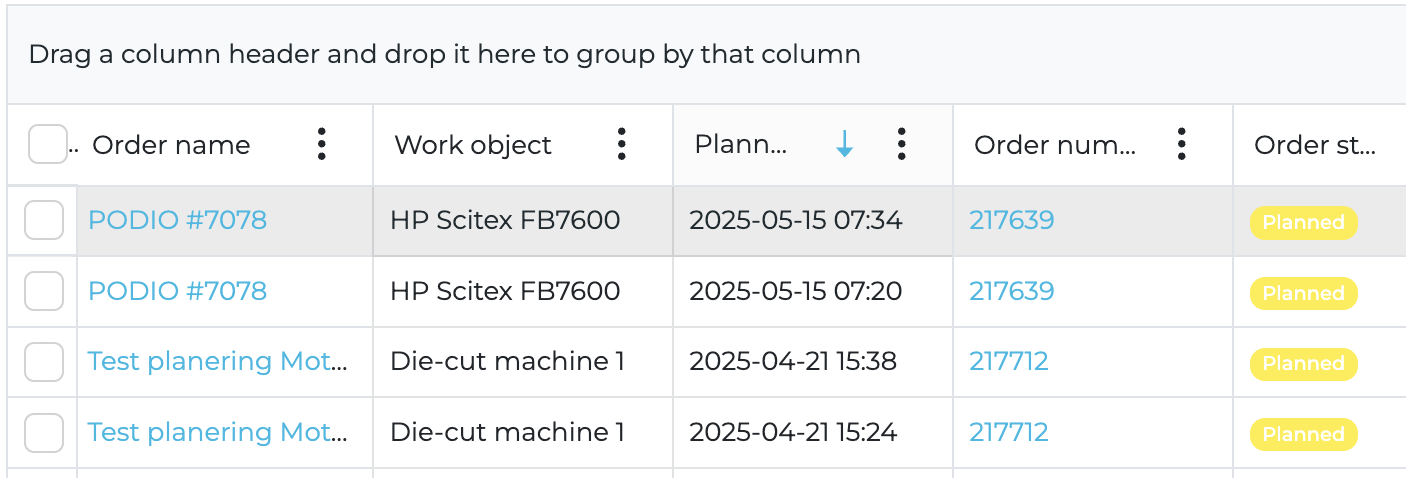
The Report-API has been enhanced with new fields
Salutation on Contact, Sales Manager and Project Manager on Quotation, Order Confirmation and Invoice
Finished goods article on Product on Order Confirmation
Planned Delivery, Planned Arrival, Actual Delivery and Actual Arrival on delivery node on Quotation, Order Confirmation and Invoice
Data is "Washed" when pasted in rich text editors. This means that if you copy and paste text from other programs some formatting will be removed and make the text more standard. We have also added a button where you can edit the formatted HTML in the editor if you want and have the knowledge how to.

A new integration point has been added in the Report API for Post Calculation. This will make it possible to create custom Post Calculations.
A problem with Order Amount and Discounts in Percentage on Order Conformations has been fixed.
Plus additional minor adjustments and fixes.
Important information for next releases - We will do a very big refactoring on how we handle plate costs in the system. Instead of specifying the generic cost of one plate on the machine card you will instead specify what plate article you will use for the specific machine. When the estimation is done in a quotation or order the cost will be generated as article needs on the product instead of a material cost on the print operation. This will also make it possible for operators to report how many plates were used in the production to have a more accurate post calculation.
Important Tip - In the upper right corner you can select the period you want to see data for. Try to use year as often as possible. This will increase performance for you significally.
2025-04-06
A problem when the unit price of a product was not handled correctly when it belong to a product group and the quantity was configured as quanity per unit is now fixed.
It is now possible to see attached files when you open a previous sent email in the communication messages. This is only possible for new emails and not for previous ones.
We have extended the public API to also include:
Transports
Product color specification
A problem where the first order in a tenant did not get an order number is now fixed.
A problem where an imposition did not inherit the account imposition margins correctly is now fixed.
We have done re-architecture in the frontend to handle list data better. This will improve performance when loading data.
In the integration for e-invoicing with Pagero we now also includes order reference numbers.
Plus additional minor adjustments and fixes.
2025-03-23
We have enhanced the planning engine so it is now also creating planning cards for external production of operations. If you change an operation to be produced by a supplier you will get a planning card for that operation also. When you check the planning calendar you can see that a planning card is done by a supplier by a truck icon on the planning card in the scheduler.
In the upcoming sprint we also will make it possible to filter on external production.
In the upcoming sprint we also will make it possible to filter on external production.
It is now possible to override the quantity on addressing operations.
A problem when the on-print operation was not getting the right sort order in the production flow is now fixed.
Salutation is added on contacts and users so it is now possible to specify if a person is to be addressed as Mr, Mrs, Ms or Mx.
A problem when deleted operations were included in the operations list in the report API is now fixed.
A problem when the discounts was not displayed correctly in our standard report for order confirmations has now been fixed.
A problem when enveloping was not being calculated correctly when using price lists has now been fixed.
A problem when the reported start and end time in shop floor data collection was not handled correctly has now been fixed.
A problem when splitting the planning to multiple planning cards to has now been fixed.
A UI rework have been done on the imposition editor.
Margins are now shown in a separate dialog
Folding blocks are now shown in a separate dialog
KPI:s are shown below the editor to give a summary of the imposition
Profile is added as a new column in the planning card list.
The Report API now also support product formats using decimal values.
Plus additional minor adjustments and fixes.
2025-03-02
It is now possible to move a complete series of planning cards.
When you move a planning card you will get an option to move the single planning card or the entire series of planning cards. If you move the entire series the first planning card will be moved to the date and time you selected and the following planning cards will be moved according to availability on the work object.
When you move a planning card you will get an option to move the single planning card or the entire series of planning cards. If you move the entire series the first planning card will be moved to the date and time you selected and the following planning cards will be moved according to availability on the work object.
We have adjusted how to convert order to invoice. When order is converted to invoice it is only possible if the order has:
Invoice address
Invoice method
Customer corporate registration number
Customer country
We have adjusted the BI API so we include tags. This means that dashboards will have the possibility to filter on tags.
We have re-activated cache in lists. This means that if you do any filters or search in a list, navigate to another card or list and return to the original list you will see the original state.
When a quotation, order or invoice is being created it will inherit the profile from the company first and from the user as a fallback.
A problem when the start and end date on a time report was not set correctly when doing time reporting or updating an existing time report has been fixed.
We have added fields for actual cost to support the calculation of post calculation. This has been added on:
Time report
Purchase order row
Transport
We have made a complete re-work of the calculation engine to improve performance and flexibility.
We have adjusted the report API to add additional fields for:
Article
Article need
Quotation
Order confirmation
Invoice
A problem handling decimal values on article cards has now been fixed.
It is now possible to remove stock shelfs.
Plus additional minor adjustments and fixes.
2025-02-10
We have adjusted the planning calendar to visualize the availability. When calendar is available is not it will be displayed as gray and when it is available it will be displayed as white.
A problem when it was not possible to remove parent products before removing the child products has been solved.
We have extended the report API to include data for quotations, orders and invoices. This means it is now possible to create unique templates for each customer. Contact us if you want to discuss this possibility with us.
We have also made a lot of optimizations and improvements on the backend and API that will effect performance in the system.
Plus additional minor adjustments and fixes.
2025-01-08
A new condition for Original has been added in the price list for operations of types: prepress, original and other. This means it is now possible to set different customer prices for these operations depending on the type of original.
A problem when badges in the user interfaces could not show correct translations with all types of alphabets has now been fixed.
It is now possible to use the API to add new paper qualities for the article register.
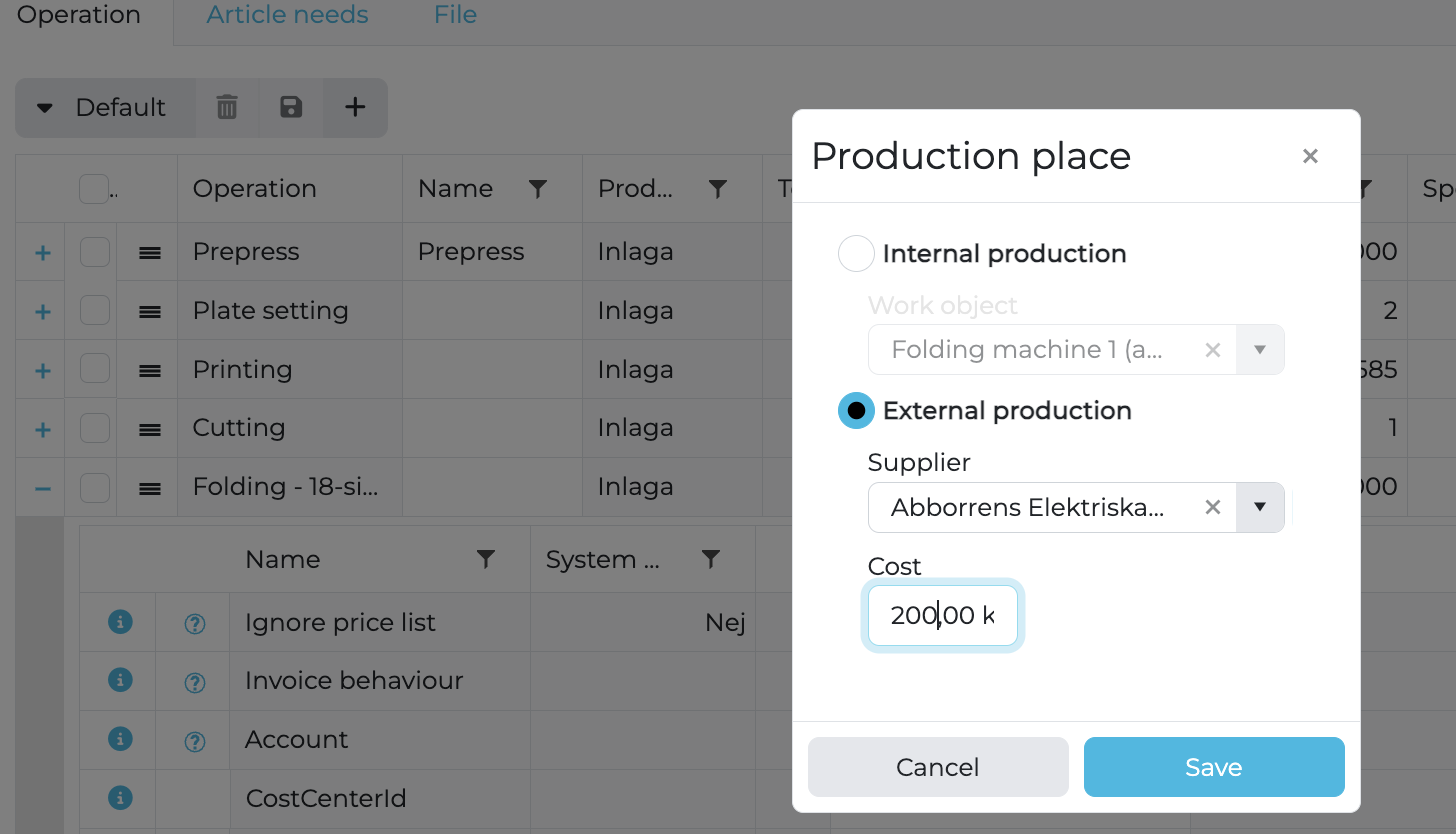
We have made a complete rework of how the external work is handled. Now it is possible to set the internal work object or the external supplier on an operation in the same component. Here it is also possible to set the purchase cost for the operation. If you then expand the operation you can also set all additional information like normal.
It is now possible to create manual time reports. If you have something that you want to register a time report for and it does not belong to a planning card in an order you can add the time report manually and fill in the relevant information.
Duration has now been added to the integration for order data in the BI. This makes it possible to display the make ready and production time on an order or parts of an order in dashboards in the BI.
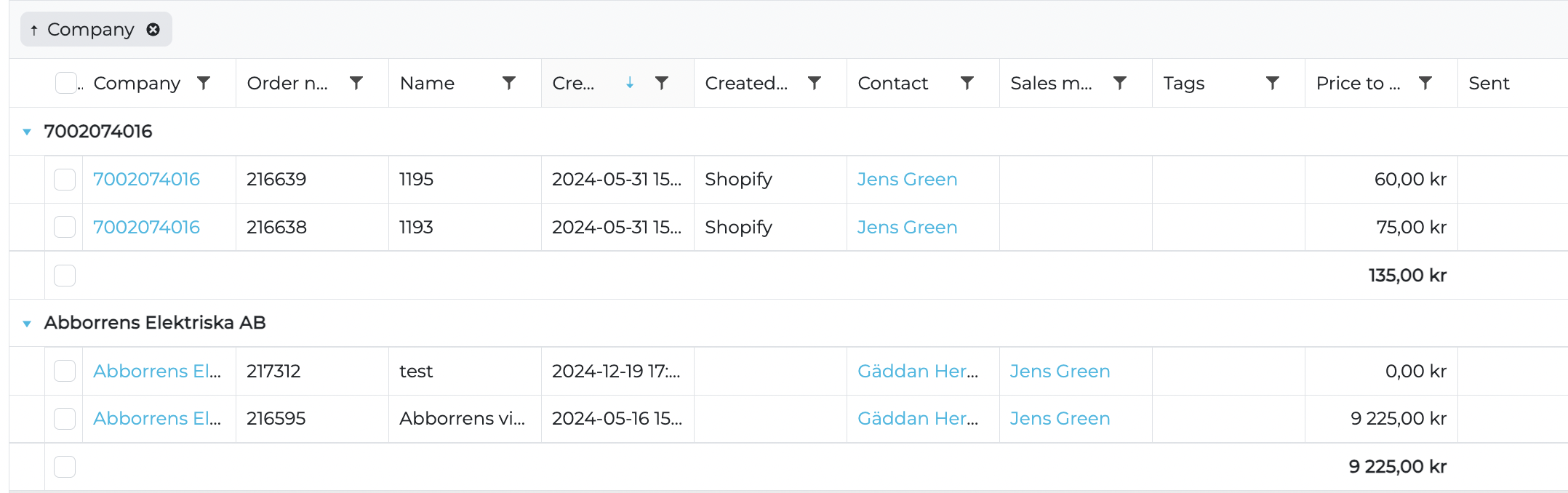
We have added summary in lists when you group on one or more columns.
We have added an icon on the planning card indicating the status of the related articles to an planning card. If the article is available it is green and if the article is not available it is red. If there are multiple articles related to the planning card, all articles must be available for it to be considered to be available and indicate green.

We have added the support for the Romanian language in the system.
We have added support for supplier price lists for external work. If you set an operation to be produced externally by a subcontractor and that subcontractor has a supplier price list configured this price list will be used to calculate the cost for the operation. The customer price will be calculated like normal using markup, custom price or customer price list.
Additional folding schemas has been added. The new ones are:
18-page fold (3x3)
24-page fold (4x3)
24-page fold (3x4)
We have added support for multiple invoice number series. You can configure if you want a profile to use a unique invoice number series or not. If you set it to yes all invoices for that profile will have a unique invoice number series. If you use a profile with this set to no the invoice will get the invoice number from the normal invoice number series. This switch could not be toggled back and forth so if you have set it to yes and created an invoice number using that profile you cannot switch it back. You will have to create a new profile.
Plus additional minor adjustments and fixes.
Related Articles
Release Notes Archive - 2024
2024-12-15 We have added additional support for optimizing the calculation of the number of plates when printing multiple signatures with similar colors. When you specify the editions you can now add information about unique colors. This will be ...Release Notes Archive - 2023
2023-12-11 A major update regarding report layouts have been implemented. We now have an architecture that allows customer specific report layouts. This will be released over time, starting with the purchase report. Over time this will be supported ...Release Notes 2026
New Release Version: 2026.8 Release date: 2026-06-29 Version 2026.8 delivers new estimating and sales-pricing capabilities, CRM and purchasing enhancements, expanded API and integration support, and a broad set of fixes across estimating, finance, ...Differences between Omikai 1 and Omikai 2
Goal This article should explain what information is migrated from the old version (v1) to the new version (v2) of the system, so you can plan and verify your upgrade with confidence. The provided transcript does not include the detailed list of ...Migration process
Goal This article explains the end-to-end process to migrate from the legacy environment (version 1) to the new environment (version 2). It describes each phase, responsibilities, approvals, and what happens at go-live. Procedure Step 1: Plan the ...