Release Notes 2026
New Release Version: 2026.8 Release date: 2026-06-29 |
Version 2026.8 delivers new estimating and sales-pricing capabilities, CRM and purchasing enhancements, expanded API and integration support, and a broad set of fixes across estimating, finance, planning, and stock management, together with infrastructure and performance improvements.
Release Summary • Estimating:
New reset status for quotations, sales price method on products, piece and
circumference calculation, parent-product cutting, and a calculation template
type column • Finance:
Optional account when marking invoices as paid • Sales
& Orders: Select an existing company location on sales order lines and
expanded External work cost fields • CRM
& Purchasing: Protection of customer and address types in use, supplier
invoice and delivery data, and additional list columns • Stock
Management: Weight per unit on selected esource types, internal resource
number, and actual purchase cost in the stock log • Transport:
New transport wizard step with per-product quantities and automatic grouping • API
& Integrations: Resource purchase endpoints, media management, report API
additions, and test e-mail • Fixes
& Performance: A broad set of fixes across estimating, finance, planning
and stock, plus new database indexes and architecture work |
New and Improved
Estimating
New “reset” status for quotations
Quotations now support a status that resets the document, mirroring the behavior already available on orders. This replaces the previous “New” status and removes the “Lost” and “Cancelled” statuses, making status handling more compatible with external CRM integrations.
Piece and circumference calculation
Quantities can now be handled per operation – for example enveloping only a subset of products or calculating the number of eyelets from the chosen side and spacing – so resource needs reflect the actual quantities used by each operation.
Cutting on parent products
Cutting added to a parent product is now calculated correctly using the aggregated product height.
Finance
Optional account when marking an invoice as paid
The account field in the “Mark as paid” popup is no longer mandatory, so an invoice can be marked as paid without entering account details. A payment row is created only when payment details are provided.
Sales & Orders
Expanded External work cost fields
The External work modal now includes additional fields – Following supplier cost, Transport cost and Following transport cost – together with a switch to define these as a fixed cost or per product. The corresponding values are propagated to the operation detail.
CRM
Protection of customer and address types in use
It is no longer possible to remove the “Customer / Supplier” company type or the “Delivery / Invoice address” address type while the company or address is used in sales or purchase documents. The check is enforced in the API layer to safeguard data integrity.
Additional columns in company and resource views
The company list now includes Legal name (searchable), Accounting code and Account number, and the internal resource number is available in the resource selector.
Stock Management & Purchasing
Weight per unit on resource types
A “Weight per unit” field has been added to resource types such as Envelope, so the weight of the produced product is based on the actual unit weight rather than the paper grammage.
Supplier invoice and delivery data in purchases
Purchase orders now support a Supplier invoice number and an invoice status (received, paid, exported), and stock transactions support a Supplier delivery note number, improving integration with bookkeeping systems. The relevant public API endpoints have been updated accordingly.
Internal resource number
The internal resource number is now shown on the resource detail page and in the resource list and is included in the resource export.
Transport
Transport wizard – quantities and grouping
The transport wizard now lets you set the quantity of each product to include, and automatically groups transport by delivery address and planned delivery date, creating a delivery per grouping.
API & Integrations
Resource purchase API endpoints
New public API support for resource purchases, including a Purchase account field on companies to support accounting links.
Report API additions
The report API now includes Customer marking on quotation and order confirmations.
Work with files via the API
The public API now supports creating, reading, updating and deleting media – including uploading a file or adding a link, and setting a tag and description.
Test e-mail functionality
You can now test your e-mail provider settings directly from the profile and user page.
Platform & UI
Mexican Spanish language support
Added support for Mexican Spanish across the platform.
Fixes
Estimating
Price lists applied to all products
Fixed a regression where the default price list was applied only to child products and not to single or parent products.
Supplier cost override now affects the calculation
Overriding the supplier cost on an operation now correctly affects the calculation result.
Customer discount on quotes
When you change the customer on a quote, you can now clear the discount to reset it to the new customer’s default; previously the original customer’s discount remained.
Printing sheet width in the speed table
Fixed the “Printing sheet width” column in the speed table for digital printing machines so that entered values are again taken into account.
Product template status no longer changes unexpectedly
Fixed an issue where production statuses on child rows changed unexpectedly when editing a product template created from a quote.
Production information retained when changing customer
Production information is no longer lost when the customer on an order or quotation is changed.
Automatic recalculation of plates and intake sheets
Changing the imposition or work object now updates the number of plates and intake sheets without requiring a manual refresh or recalculation.
Quote status not set to “Sent” when e-mail fails
A quote is no longer marked as sent when the e-mail could not be created, for example when the selected recipient has no e-mail address.
Finance
Confirmation when sending an invoice
A confirmation window now appears when sending an invoice from within the invoice, showing the recipient and the message that will be sent.
Invoice approval validation
An invoice with errors in the approval process is no longer locked or assigned an invoice number. A dry run now surfaces the errors first so they can be corrected.
Document status not set to “Sent” on failed delivery
Quotations, orders, purchase orders and invoices are no longer marked as “Sent” when delivery fails due to missing or expired e-mail credentials, and the status can be reverted correctly.
Order
Planning card tab “+” button removed
The “+” button on the planning card tab no longer creates a new order; it has been removed, since planning cards are not created this way.
Company-specific projects restricted to their customer
A company-specific project can now only be selected on quotes and orders for that same customer.
Planning
Editable resources on planning cards
Resources on planning cards are now editable, and the planning calendar hover view again shows the resource format and grammage.
Unselect all planning cards when grouping is active
An “unselect all” action has been added to the planning card view, so all cards can be deselected at once when a grouping is active.
Stock Management
Stock log uses the actual purchase cost
The stock log cost and the weighted average value per stock unit now reflect the actual purchase cost of an inbound delivery rather than the calculated cost.
Inventory of unknown stock with mandatory stock management
Inventory export now includes the Unknown location for both mandatory and optional stock management, and import handles it correctly so negative amounts at unknown locations can be corrected.
Grouping and filtering resources
Resources can now be grouped by tag or supplier and filtered by typing a search string, matching the behavior of the resource need’s view.
System
Correct cost for manually added resources in report-back
When manually adding multiple resources to a planning card during report-back, each resource now uses its own cost in the resource report; previously the first resource’s price was applied to all.
Resource report with long descriptions
Reporting back with a long description no longer causes an error or a stray article report entry. The description field has been extended, and report-back is now transactional.
Filter section expanded by default
The Filter section is now expanded by default when opening the column and filter menu.
“Last changed” in the product template table
The “Last changed” column in the product template register now shows the date and time of the last change.
Decimals in Cutdown format measurements
Cutdown format measurements now accept decimal values, supporting conversions from imperial units.
Sorting restored in the tenant view
Restored sorting functionality in the tenant view.
Invoice behavior in reports
Fixed missing and untranslated invoice behaviour values in reports.
Performance under concurrent load
Addressed performance issues observed under high concurrent load.
Deleted companies
Deleted companies can no longer be extended with new contacts or other related data.
UI/UX
Mass edit changes visible immediately
Changes made through mass edit – for example the account plan on invoice rows – are now shown immediately without refreshing the page.
Personal favorite views persist
A personal favorite view now stays applied when navigating away from and back to a list.
New item wizard save button
Fixed the New item wizard so that the Save button is fully visible.
“Go to” arrow icon after refresh
The “Go to” arrow icon now remains active after the page is refreshed.
Resource report dropdown layout
Improved the “Actual resource” dropdown in the resource report so columns are wide enough to show distinguishing information, and headers stay aligned when scrolling horizontally.
Price list detail page
Fixed an error were opening the detail of a price list redirected to an unknown page.
Purchasing
Swedish purchase resource-type translations restored
Restored the previous Swedish (and other language) translations for purchase resource types.
System Maintenance
• Cleaned up the public API documentation, including sorting, terminology, examples and mandatory-field indicators.
Known Items and Minor Adjustments
Plus, additional minor fixes and internal adjustments across localization, performance handling, and estimating behavior.
|
New Release Version: 2026.7 Release date: 2026-05-17 |
|
Release Summary • Estimating: Sort children of multi-part products, read-only attribute controls, and improved planning card field references • Finance: Editable expiration dates on quotes and invoices, invoice 'New' status visibility fix, read-only attribute enforcement • Production Flows: Auto-arrange worksteps, intent operations framework, performance improvements, and architecture refactor • Transport: New transport wizard for product/edition-level delivery, tracking link column, and numeric order number sorting • Import / Export: Company, Address and Contact import/export, resource import/export adjustments, and improved paper quality handling • Stock Management: Fixed mandatory stock withdrawal validation and invoice behavior Excel import/export • API & Webhooks: Fixed 'Order created' webhook triggering on PUT, improved webhook Content-Length header compatibility • System & Performance: Audit log MVP, application status notifications, mass edit performance, and multiple infrastructure improvements |
|
Current term |
New term |
|
Quotation |
Estimate |
|
Product |
Calculation |
|
Order |
Job |
|
Product template |
Calculation template |
|
Operation |
Workstep |
|
Operation template |
Workstep template |

New Release
Version: 2026.6
Release date: 2026-04-14
New and Improved
API and Integration
Public API
The following fields are now available:
Invoice
-
Invoice.TrackingNumber -
Invoice.ExpirationDate
Invoice Row
-
InvoiceRow.IsTransport -
InvoiceRow.OrderId - relation from InvoiceRow → Transport
Order & Quotation Operations
-
Operation.FrontColors -
Operation.BackColors -
Operation.FrontColorSpecification -
Operation.BackColorSpecification -
Operation.NetPrice -
Operation.Supplier(full node)
Transport
-
Transport.PlannedDelivery -
Transport.PlannedArrival -
Transport.ActualDelivery -
Transport.ActualArrival
Article / Resource Needs
-
ArticleNeed.ProductionQuantity -
ArticleNeed.IntakeQuantity -
ArticleNeed.OperationName -
ArticleNeed.OperationType
Report API
Extended support for:
- Job Ticket front/back color fields
- color specifications
- delivery note customer department
- customer cost center
- customer marking
-
Product.PublicDescription -
ExpirationDate - operation net price
- article need operation details
BI API
Post-calculation reporting alignment now includes:
-
OperationCalculatedMakeReadyTime -
OperationCalculatedMachineTime
This creates better consistency between:
- production reporting
- BI reporting
- post-calculation exports
Integration robustness
Additional integration hardening includes:
- improved Pagero invoice sync diagnostics
- better error handling in failed sync scenarios
- more reliable field consistency between APIs
This significantly improves downstream integrations for:
- finance
- logistics
- production reporting
- custom BI pipelines
Purchasing
Purchase quantity logic
Fixed an issue where creating purchases from the resource list could generate incorrect quantities.
The logic now correctly:
- ignores unrelated existing purchases
- respects minimum quantity
- calculates intended purchase volume consistently
This improves purchasing accuracy and reduces manual correction work.
Invoicing and Reporting
Invoice approval locking fix
Resolved an issue where invoices could receive an invoice number and become locked even when the approval process had not completed successfully.
This improves transactional consistency and prevents partially approved invoice states.
Large invoice summary reports
Fixed a regression where Invoice Summary and Account Plan Summary reports could fail when generating larger datasets.
The report flow now supports significantly larger invoice selections and improves timeout resilience.
SFDC and Production
Create SFDC from resource need
A new workflow improvement now makes it possible to generate SFDC reporting directly from resource needs.
This simplifies production feedback registration for material-driven workflows.
Work order resource requirement regression
Resolved a regression where work orders showed an error while resource requirements were otherwise calculated correctly.
Work orders now load reliably again in these scenarios.
Resources and Costing
Resource cost fallback behavior
Fixed issues affecting resources without cost values.
The system now handles missing cost data more gracefully and avoids downstream calculation failures.
Quotations and Orders
Media cloning regression
Resolved an issue where files and media attachments were not copied when cloning quotations.
Cloned quotations now retain:
- uploaded files
- media references
- linked documentation
This restores expected quotation duplication behavior.
Product list checkbox fix
Fixed a regression where checkbox selection in the product list did not behave correctly.
Bulk actions and list workflows now function as expected again.
Inline editing reliability
Improved inline editing behavior in list views to prevent data inconsistencies and failed updates.
Planning and Scheduling
Planning card move regression
Resolved a critical regression where moving a planning card using Move planning card caused the card to lose its connection to the work object.
The relationship between:
- planning card
- work object
- status flow
is now preserved correctly during moves.
Other
Plus additional minor fixes and internal adjustments across resource management, estimating behavior, and API consistency.
New Release
Version: 2026.5
Release date: 2026-03-29
New and Improved
Ignore fiber direction on resources
Export resource needs to Excel
Filter resource needs on selected products
Production orientation now affects resource needs
Resource import duplicate validation
Resource need removal fix
Payments and Invoicing
Payment registration API
Payment list UI
- Mark as paid will create a payment of the remaining amount
- Mark as part paid will let you create a payment of a specific amount
Invoice rows and account plan in BI
Purchasing
Purchase quantity fix
Estimating and Calculations
Sales markup calculation fix
Cost centers in calculations
Discount handling improvements
Create product resources from calculation
Operations from production flow
Product clone: resource cost and price
Quotations and Orders
New columns: reseller
API additions
Copied quote/order creator
Stored procedure elimination: CloneOrder and CloneProduct
Price lists on resource needs
Custom resource consumption
Connect contacts with address
UI and Usability
Enhanced favorite views
Checkbox filtering on notification columns
Media tab replaces file tab
Yellow label readability
Messages tab for sent emails
Clear product IDs on delete
Languages
New language support
Planning and Production
Planning card behavior adjustments
Calendar drag-and-drop notification fix
Picking list
Post calculation reporting
Stability and Internal Improvements
Delivery note timeout fix
False warning cleanup
Operation template color modal fix
Packaging consumption fix
Other
New Release
Version: 2026.4
Release date: 2026-03-15
Notes
Localization: Turkish language support added and Spanish regional data expanded.
Invoicing: Stability improvements when approving invoices under heavy load.
Notifications: Long-term performance solution introduced for system notifications.
Estimating: Fixes for price list behavior and sheet part ordering.
Reporting: Correct timezone handling in standard work orders.
New and Improved
Localization
Turkish language support
Support for Turkish language has been added across the platform to improve usability for Turkish-speaking users.
Spanish regions and provinces
Regions and provinces of Spain are now available for all tenants to improve address validation and master data consistency.
Invoicing and Payments
Invoice approval timeout fix
Resolved an issue where customer invoices could not be approved due to timeout scenarios. This was occurring when an invoice had an enormous amount if invoice rows.
Improves robustness of invoice approval workflows in environments with higher load or large datasets.
Notifications and Performance
Long-term solution for system notifications
A structural improvement has been implemented to handle system notifications more efficiently.
This reduces performance impact in list views and improves overall system stability.
Estimating and Product Templates
Price list behavior for migrated orders (parent/child products)
Fixed an issue where price list prices were incorrectly applied for migrated orders from OMIKAI 1 using parent and child product structures.
Ensures consistent pricing logic during and after migrations.
Sheet part ordering in product template conversion
Resolved an issue where sheet parts could change order when converting from product template to product.
Maintains intended structural sequence and improves predictability in estimating and production preparation.
Reporting and Time Handling
Standard work order timezone correction
Fixed an issue where standard work orders displayed times in UTC/GMT instead of the account timezone.
Work order reports now correctly reflect local time settings.
Known Items and Minor Adjustments
Plus additional minor fixes and internal adjustments across localization, performance handling, and estimating behavior.
New Release
Version: 2026.3
Release date: 2026-03-01

- API: Public API, Report API, and BI API extended with new fields, new endpoints, and alignment changes.
- Resource model: Multiple suppliers supported and resource types expanded.
- Planning: Deadline feasibility warnings and recalculation awareness.
- Purchasing: Better supplier behavior, costs, addresses, and the ability to cancel individual purchase lines.
- Fixes: Calculation regressions, invoicing edge cases, price list actions, inventory export completeness, and UI issues.
New and Improved
Public API
Currency update behavior
Conversion rate support added for currency updates.
Decimals support added for currency updates.
Removed rounding on all currencies.
Update semantics for entities
Id is now expected in the endpoint (path) instead of in the payload (body) for updates, for:
Company
Location
PlanningCard
Transport
Tags endpoints (API endpoints for tags)
New tag management endpoints to match UI behavior:
Get tags
Create tag
Update tag
Delete tag
Soft deleted handling in find vs get-by-id
For Quotation and Order:
Find endpoints ignore deleted entities.
Get-by-id endpoints still return deleted entities and include an IsDeleted field to indicate deletion state.
Invoice note:
The same “ignore deleted in find, show in get-by-id with IsDeleted” behavior was requested for Invoice, but is not implemented because Invoice does not currently have an IsDeleted property. Invoices are hard deleted.
Transport distribution extensions
Transport distribution was extended to include a complete Article node in:
Distribution.Parcel
Distribution.Carrier
The Article node includes:
Width
Height
Length
Thickness
In addition:
Product weight is added in the distribution data.
Webhook control endpoints (Control the webhook flow via API)
New API coverage to support operational control of webhook delivery and retries:
GetWebhooks
Query parameters:
Topic
ObjectId
GetWebhookDeliveries
Query parameters:
Delivery status
Attempt status
Topic
ObjectId
Retry endpoint to trigger a retry for webhook delivery attempts
Report customization
Parameters in report creation
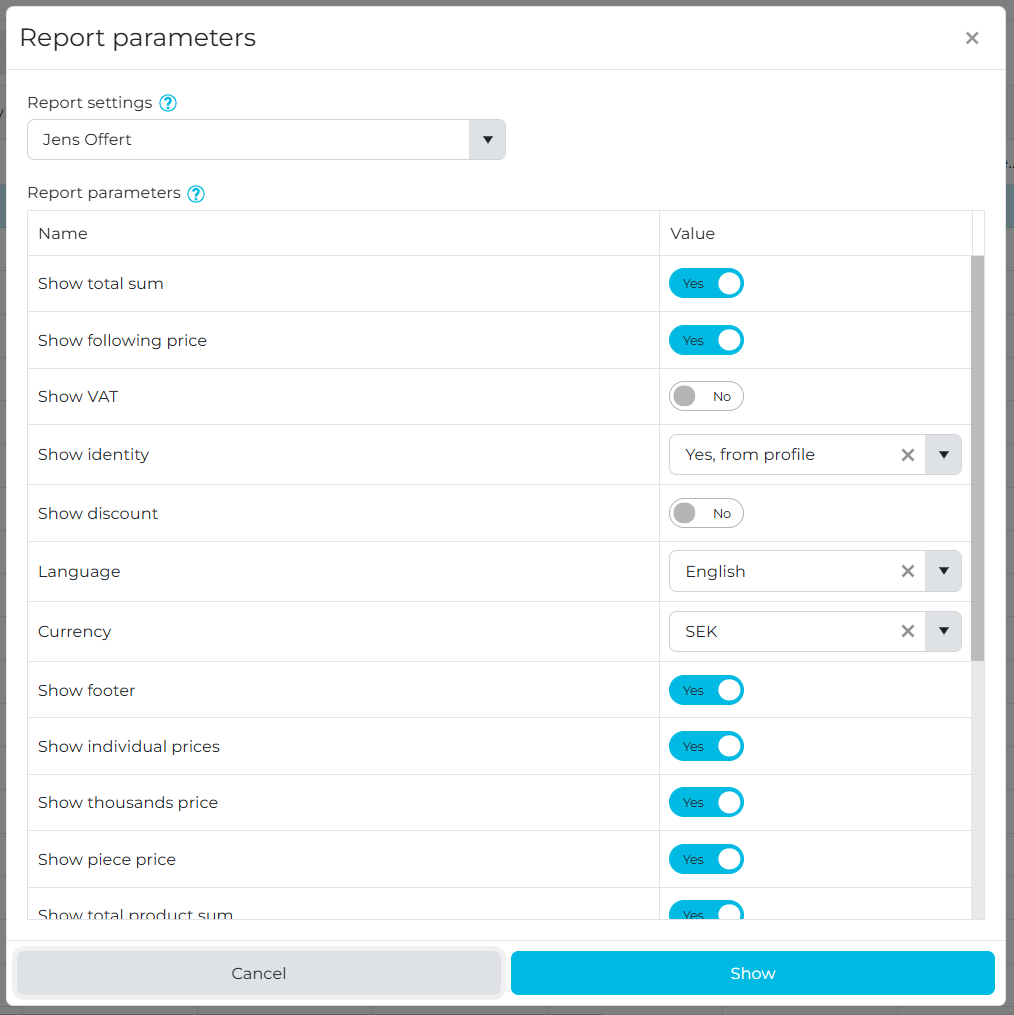
All reports now support parameters when creating a report document
You can specify all parameters from the report setting
You can chose another report setting
All reports now support parameters when creating a report document
You can specify all parameters from the report setting
You can chose another report setting
This functionality will not be available for everyone automatically. We can activate this per tenant after a discussion where we ensure that all custom reports are compatible with the usage of the parameters.
This functionality will not be available for everyone automatically. We can activate this per tenant after a discussion where we ensure that all custom reports are compatible with the usage of the parameters.
Report API
Logos in report endpoints
All report “get” endpoints are extended to include both logos:
ProfileLogoURL
CustomerLogoURL
Current behavior previously included only the Profile logo, this change adds Customer logo too.
Invoice reporting fields
Invoice endpoints extended with:
Terms of delivery
IsTransport
Tracking link
Job ticket endpoint alignment (Work order from Product list fix)
Job ticket behavior was adjusted to support product-oriented usage:
Query parameters are aligned across order/product and product so the same job ticket custom template can be used.
Query parameters are aligned so it is possible to control which products are included in the job ticket output.
UTC handling in reports (Handle UTC in reports based on Accounts timezone)
Report timestamps are adjusted to respect the account’s timezone when handling UTC.
BI API
Profile metadata in BI endpoints
ProfileId and ProfileName should be included in all BI endpoints.
Specifically called out as currently missing in ArticleReport, with a request to verify other endpoints as well.
Added fields for BI reporting
BI endpoints extended with “Product Invoice Status” coverage in:
Time report: Product Invoice Status
Article report: Product Invoice Status
Order and Quotation extended with:
Product.AccountPlanName
Product.AccountPlanNumber
Resource Model and Master Data
Multiple suppliers on resources and resource needs (Allow no or multiple suppliers)
Supplier selection behavior updated:
On the Resource detail page:
Supplier becomes a multi-select (choose one or many suppliers).
On Resource Need creation:
Supplier selection rules:
If resource has no suppliers: supplier field is empty and you can choose any supplier.
If resource has one supplier: supplier field is set to that supplier.
If resource has many suppliers: supplier field is empty but you can only choose from the resource’s suppliers.
Purchasing constraint:
You should not be able to create purchases from resource needs if they do not have a supplier (linked to “Purchase without supplier”).
Import/Export update for resources:
Supplier import uses a comma separated list of company numbers instead of company names.
If supplier exists comma separated list it will be updated.
Resource identification during import is based on resource number.
Supplier condition checks in customer price lists must match against the comma separated supplier list.
Resource types and hierarchy work (Create new Resource types, Resource Type hierarchy)
New resource types introduced for the label and packaging industry including basic attributes.
A resource type hierarchy baseline is implemented:
Keeps existing legacy resource types.
Introduces additional types and classes.
Implements rule-set constraints between Classes, Substrates and Resources
Additional resource ports for Production Flow (Additional Resource related ports)
Resources module extended with additional “ports” for consumption by Production Flow:
Inventory export behavior updated:
Resources with a storage location are included in inventory export even when:
Stock balance is 0
Stock balance field is empty
Resource settings UI mix-up (Resources settings section mixes up)
Fixes to the resource settings UI section where values were being mixed or presented incorrectly.
Planning and Scheduling
Deadline feasibility warning (Warning if deadline can’t be kept)
Show warning on:
Planning card
Product
Order
A product is considered impossible to deliver on time if:
The last planning card ends after the order’s “ready for delivery” date (as described in the order delivery date section).
Recalculation awareness after planning (Warning if order recalculated after planned)
A warning is added when an order is recalculated after it has been planned.
Product changes trigger recalculation
Product changes now trigger recalculation to keep calculations and derived data consistent.
SFDC grid usability (default width and behavior)

SFDC grid defaults adjusted:
Default width changed
Behavior updated as requested (grid interaction refinements)
Purchasing, Suppliers, and Inbound
Purchase email field (Company card -> Contact)
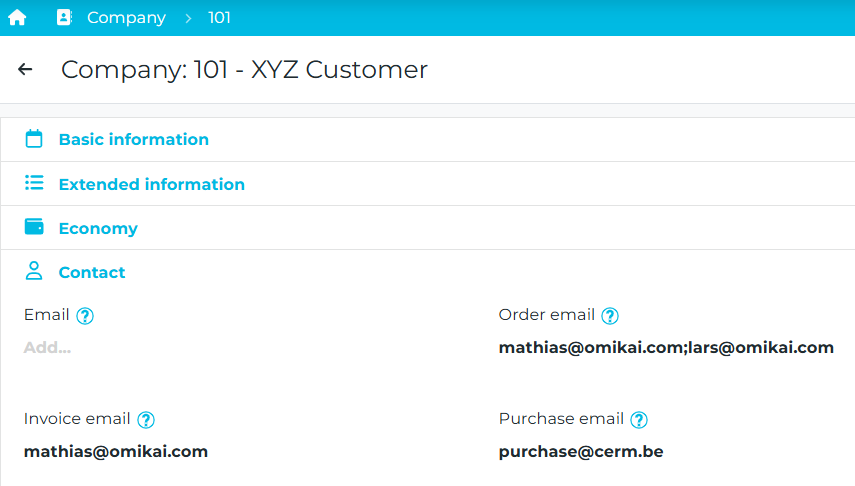
Added missing “Purchase” email field on Company contact settings.
This email corresponds to purchase order emailing behavior.
Cost tier behavior in purchase rows
Purchase row cost is now dynamic and takes the correct price from the appropriate tier when the tier changes.
Default addresses when creating a purchase
Fixed regression where default addresses were no longer set when creating a purchase.
Purchase without supplier
Support for purchasing flow where supplier handling is aligned with the new “resource can have zero or multiple suppliers” rules and constraints.
Cancel individual purchase order lines

New behavior requested for partial delivery and cancellation scenarios:
Ability to set incoming quantity of a missing or canceled item to 0.
Then set that specific purchase order line status to canceled.
Clarifies the gap where closing a purchase order with mixed delivered/canceled lines does not map cleanly to existing overall order statuses.
Inbound delivery for finished goods resource includes order number
Inbound delivery for “Finished goods resource” now includes order number.
Estimating and Calculation
Multi-part products (books) fixes
Fixes around calculating multi-part products where child rows can have “sheet” property:
Restored ability to change property to sheet for specific parts (previously worked, regression observed).
Sheet parts’ page counts should not be included in the parent’s total number of pages (previous behavior restored).
Changing the parent page count should not modify the page numbers on child rows with sheet property (previous behavior restored).
Imposition locking and cloning consistency
Imposition stability improvements:
Manual imposition changes were being reverted on recalculation.
Added ability to lock imposition so it is not updated when recalculated.
Lock behavior aligned with the concept used for “Custom sheet format”.
Lock added on:
Imposition type
Printing method
When cloning a product, the cloned product should retain the same imposition if it was locked or manually set.
Imposition view scalability
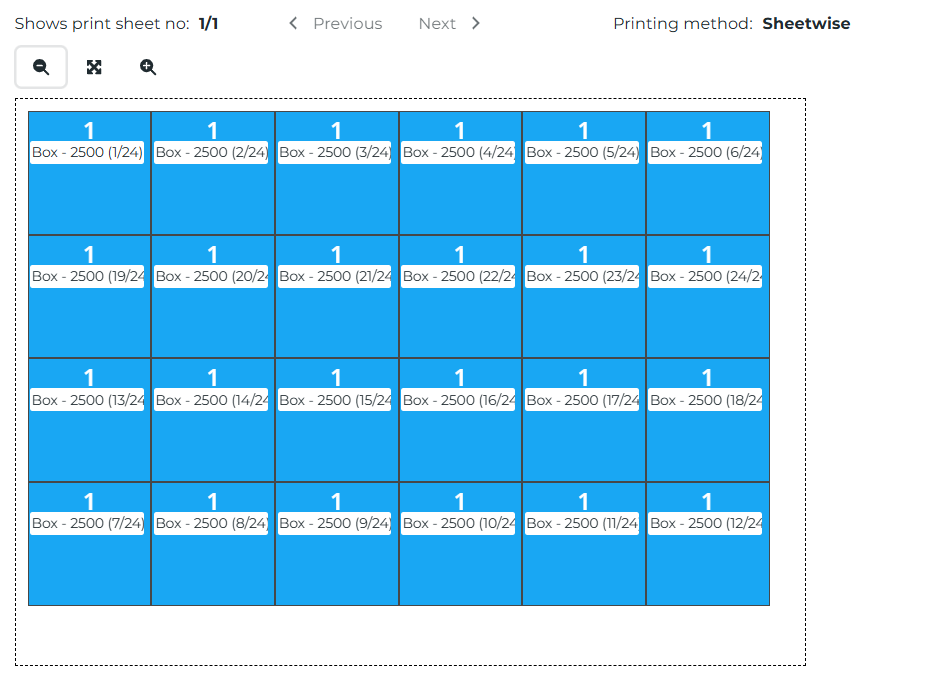
Imposition view updated to be scalable.
Allowed machine max size in operations
Improved handling of allowed machine max size constraints within operations by checking if the production format of an operation is compatible with the max and min formats on the selected work object.
Article needs precision
Expanded numeric precision for article needs:
Ability to enter and keep 3 decimals for item consumption in intake and production.
Motivated by materials like glue, ink, varnish where consumption can be 0.015 kg per m².
Cost of article when moving paper back to stock
Handling logic updated for article cost behavior when paper is moved back into stock.
Invoicing and Payments
Invoice conversion behavior
When converting from order to invoice:
“Addition” should also create an invoice row.
Inline payments regression
Fixed regression in creating inline payments. Now it is always possible to add a payment row on any invoice at any time.
Part invoicing bug fixes
Fixes for part invoicing behavior issues where the part invoicing was not working when using parent/child product types.
Orders and Transport
External work status on Order
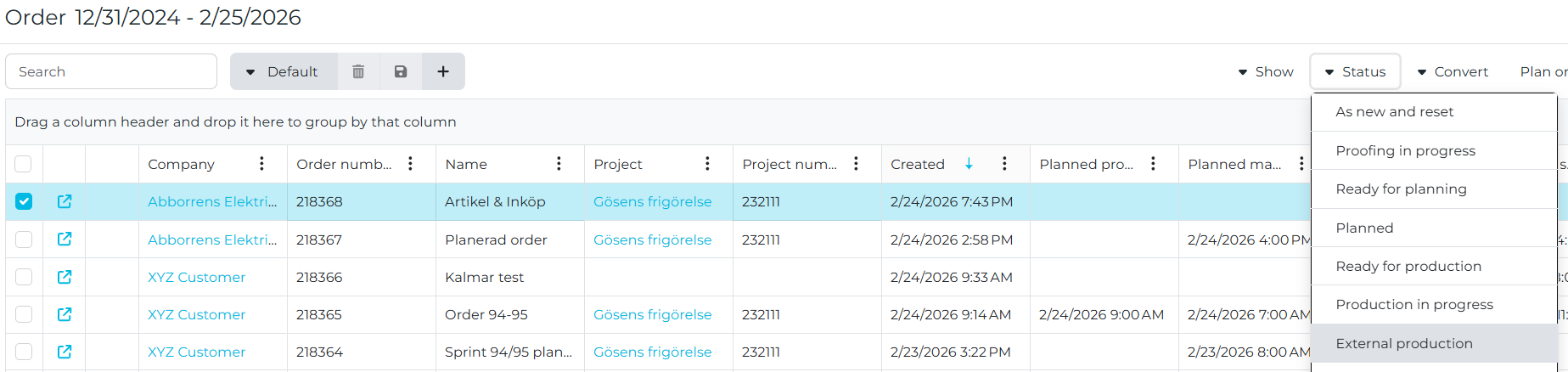
Added “External work” as a status on Order (previously only on Products).
This is a manual status only.
Transport cost setting bug
Fixed issue where setting cost on a transport did not persist or apply correctly.
Order amount shows 0 (bug fix)
Fixed issue where order amount became 0 due to a prior related change (linked to earlier Jira context).
UI and Administration
Roles as badges in user register
User register updated to show roles as badges.
Duplicate supplier column in price list
Fixed duplicate Supplier column in the article/resource price list view.
Cannot delete price list
Fixed issue preventing deletion of a price list.
Price list adjustment
- Add product tag as a condition in product template price list.
- Multiple solution options discussed, including tag-based selection and API-driven choice.
Known Items and Minor Adjustments
Plus additional minor fixes and adjustments across the platform.
New Release
Version: 2026.2
Release date: 2026-02-08
This release focuses on API extensions, integration stability, SFDC reporting improvements, and a set of fixes across estimating and purchasing workflows.
- API: Public API, Report API, and BI API extended with new invoice, transport, job ticket, delivery note, and calculation fields.
- Integrations: Pagero invoice sync robustness improvements.
- Production reporting (SFDC): Support for adding additional cost and time entries via wizard.
- Fixes: Supplier handling and summary values restored and corrected.
New and Improved
Public API and Integration
- Invoice:
- Invoice.TrackingNumber
- InvoiceRow.IsTransport
- InvoiceRow.OrderId
- InvoiceRow → Transport relation added to enable tracking linkage.
- Order & Quotation Operations:
- Operation.FrontColors
- Operation.BackColors
- Operation.FrontColorSpecification
- Operation.BackColorSpecification
- Transport:
- Transport.PlannedDelivery
- Transport.PlannedArrival
- Transport.ActualDelivery
- Transport.ActualArrival
- Article Needs:
- ProductionQuantity and IntakeQuantity now supported.
- Integration robustness - Pagero: Improved invoice sync diagnostics and error handling.
- Invoice.TrackingNumber
- InvoiceRow.IsTransport
- InvoiceRow.OrderId
- InvoiceRow → Transport relation added to enable tracking linkage.
- Operation.FrontColors
- Operation.BackColors
- Operation.FrontColorSpecification
- Operation.BackColorSpecification
- Transport.PlannedDelivery
- Transport.PlannedArrival
- Transport.ActualDelivery
- Transport.ActualArrival
- ProductionQuantity and IntakeQuantity now supported.
Report API
- Job Ticket:
- Operation.FrontColors / BackColors
- Operation.FrontColorSpecification / BackColorSpecification
- Operation.Supplier (full node)
- ArticleNeed.OperationName
- ArticleNeed.OperationType
- Delivery Note:
- Customer.Department
- Customer.CostCenter
- Customer.Marking
- Product.PublicDescription
- Cost and Price
- QuantityPerParcel and QuantityLastParcel fixed
- Invoice:
- ExpirationDate added
- Quotation & Order Confirmation:
- Operation.NetPrice
- ExpirationDate
- Front/Back Colors and Specifications
- ArticleNeed.OperationName / OperationType
- Post Calculation:
- Operation.CalculatedMakeReadyTime
- Operation.CalculatedMachineTime
- Operation.FrontColors / BackColors
- Operation.FrontColorSpecification / BackColorSpecification
- Operation.Supplier (full node)
- ArticleNeed.OperationName
- ArticleNeed.OperationType
- Customer.Department
- Customer.CostCenter
- Customer.Marking
- Product.PublicDescription
- Cost and Price
- QuantityPerParcel and QuantityLastParcel fixed
- ExpirationDate added
- Operation.NetPrice
- ExpirationDate
- Front/Back Colors and Specifications
- ArticleNeed.OperationName / OperationType
- Operation.CalculatedMakeReadyTime
- Operation.CalculatedMachineTime
BI API
- Post Calculation alignment:
- OperationCalculatedMakeReadyTime
- OperationCalculatedMachineTime
- OperationCalculatedMakeReadyTime
- OperationCalculatedMachineTime
Production Reporting (SFDC)
- Additional cost & time rows: Users can now add extra cost and time entries directly via wizard for unplanned time spent or material usage.
Click the add new button to add an additional report.
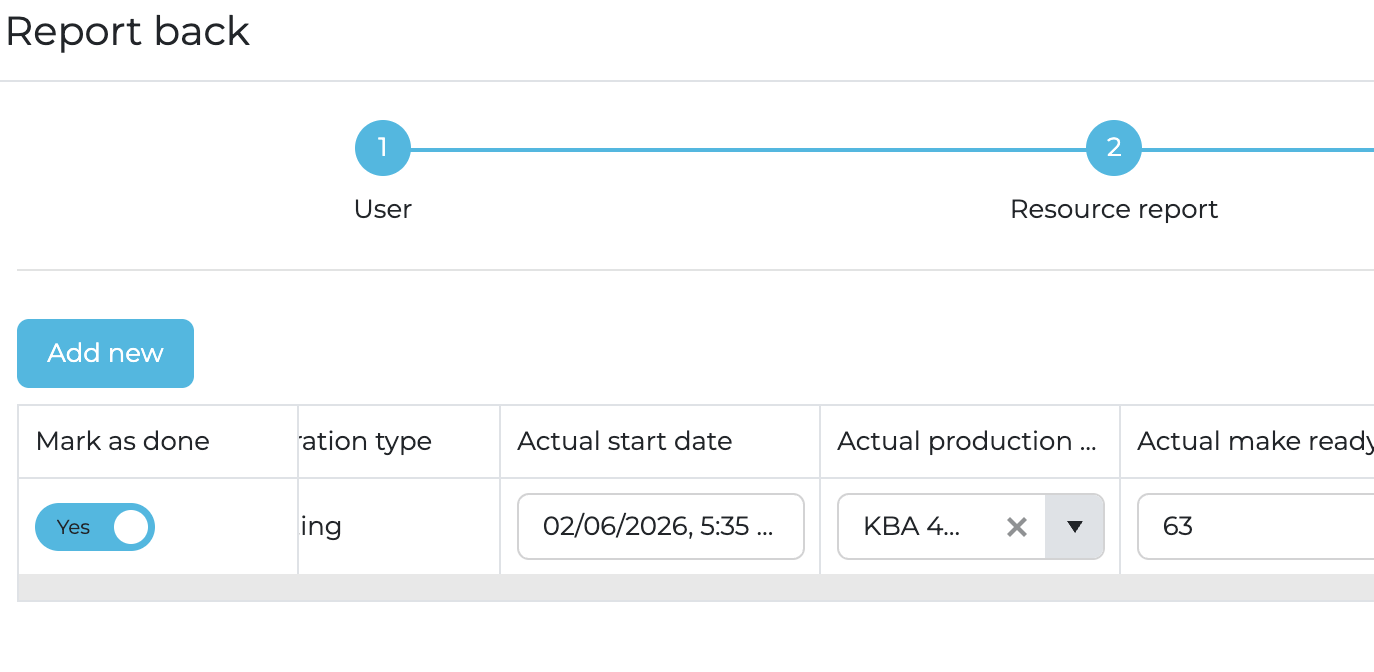
Click the add new button to add an additional report.
Fixes
- Supplier handling: Corrected supplier change behavior and mixed-supplier purchase order creation.
- Operation templates: Fixed saving issue with predefined suppliers.
- Summary values restored: Price per piece and square meter price now visible again.
Known items and fixes
- Plus additional minor fixes and adjustments.
New Release
Version: 2026.1
Release date: 2026-01-25
- Resource model: Articles have been renamed to resources to support raw materials, tools, semi/finished goods, and services.
- Order and production: Enhanced validation, warnings, recalculations, quantity display in product groups, and improved handling of dispatch dates and planning cards.
- API and integration: Extended API for reporting, public operations, and improved error messaging.
- CRM and master data: New Region/Province fields, editable lists, and UI improvements to company cards and addresses.
- UI and usability: New columns in system lists, tab labels in browser, dropdown enhancements, improved breadcrumb paths and navigation icons.
New and Improved
Resources: New Naming and Extended Concept
- Articles renamed to Resources: The term “Articles” has been replaced by “Resources” throughout the system. This change unifies terminology and supports a broader product model.
- Generic resource model: Resources can represent raw materials, semi-finished goods, finished goods, tools, or services.
- Resource Needs and Reports: Fully updated to reflect the new model, including support for new statuses and consumption reporting.
- Supports product-oriented workflow: This is a key architectural foundation for moving to product-centric flows in planning and reporting.
Order and Production
- Delivery deadline warning: Shown if the last planning card ends after the ready-for-delivery date.
This is displayed on the order header, order list and on the individual planning cards.
- Duplication logic: Ensures transport and production data are copied correctly when duplicating orders/products.
- Partially done handling: A new status is introduced to reflect phases that are done but not fully completed.
- Resource need statuses: New, Ready, In Progress, and Done are now available to reflect real-time production progress.
- Stock management mode: Can now be set to Optional or Mandatory, requiring consumption reporting in SFDC.
- Product groups: Quantities now display correctly on planning cards, operations, job tickets, and in reporting.
- Duplicate order number fix: Prevents duplicate orders if one is created via API and one via UI at the same time.
- Operations directly editable: New operations view on quotation/order pages lets you view, edit, and add operations inline. This list is also showing operations for the selected products so this can be used as a filter on the operation in the operation list.
API and Integration
- Image URLs fixed: Full S3 paths are now returned instead of only filenames in the ImageUrl field.
- Account time zone support: Report timestamps are now displayed in the account's time zone.
- Color specification: Color selection for front and back now included in GET, POST, PUT in Public API.
- SKU in product dropdown: When selecting templates in quotation/order, SKU is now visible in the dropdown.
Report API
- Job ticket endpoint: Now includes Step & Repeat information.
- Step & Repeat endpoint: Extended with imposition node and detailed breakdown of the layout.
- Operation sheets info: Each operation now includes net sheets, waste sheets, intake sheets, and data from following operations.
- Invoice summary and account plan reports: Now support up to 1000 invoices per report.
CRM and Masterdata
- Region and Province fields: Added to CRM companies, populated based on selected Country.
- Purchase tab: New tab added on company card for purchase data overview.
- Editable system lists: Delivery terms, payment terms, resource qualities, and cut-down formats can now be edited in Settings.
- Campaign export: Now includes fallback logic for addresses: favorite campaign > favorite postal > first postal address.
Invoicing and Financials
- Part invoicing: New statuses added for Part Invoiced and Fully Invoiced on product level.
- Credit balance calculation: Now includes transport cost from orders.
Import/Export
- Bulk import/export: Now supports up to 1000 resources in a single batch.
Webhooks
- Webhook results: Delivery status for each webhook call is now shown directly in the header of detail views such as invoices.
UI and Usability
- Improved summary layout and KPI expansion: New tabs: Financial, Environmental, Specification — including editable gross price and discount fields. Summary tabs now also show both calculated and actual values.
- Dropdowns widened: SFDC dialogs now display more text for easier selection.
- Navigation icons added: All detail pages now use the navigation icon (replacing pens where applicable).
- Breadcrumb path improved: Cleaned up breadcrumb text across detail pages.
- Browser tabs updated: Browser tabs now display data type and ID (e.g. “Order 17”, “Invoice 242”).
- New system columns:
- Company.Credit Balance
- Time Report.Invoice Status
- Resource Report.Invoice Status.
Localization and Quality
- Manual time report fix: Resolved issue with manual time entries on externally produced operations.
- Tag lists: All tag dropdowns across the system are now sorted alphabetically.
- Spanish locale: Date formats now use correct week start and day names.
Internationalization
- New currency added: Mexican Peso (MXN) is now available in the system.
Known items and fixes
- Plus additional minor fixes and adjustments.
Related Articles
Release Notes Archive - 2024
2024-12-15 We have added additional support for optimizing the calculation of the number of plates when printing multiple signatures with similar colors. When you specify the editions you can now add information about unique colors. This will be ...Release Notes Archive - 2023
2023-12-11 A major update regarding report layouts have been implemented. We now have an architecture that allows customer specific report layouts. This will be released over time, starting with the purchase report. Over time this will be supported ...Release Notes Archive - 2025
New Release: 2025-12-02 This release focuses on usability improvements, purchasing and transport enhancements, extended APIs for BI and reporting, webhooks migration, and stability fixes. Usability and documents: Better handling of dates, currencies, ...Differences between Omikai 1 and Omikai 2
Goal This article should explain what information is migrated from the old version (v1) to the new version (v2) of the system, so you can plan and verify your upgrade with confidence. The provided transcript does not include the detailed list of ...Update activity
Goal This article explains how to update an existing activity. You will learn how to open the activities list, find the correct record, and make changes. The system saves your changes automatically. Procedure Step 1: Open activities From the main ...